Printer monitoring safeguards against malicious users who want to gain unauthorized access to critical organizational data.
Companies and print shops are also increasingly interested in printer monitoring to reduce overhead expenses and boost profits.
However, finding the finest software for monitoring printers can be challenging. After thorough research, we’ve listed today’s printer monitoring software’s top features, pros, and cons.
What is the best printer monitoring software?
It might be challenging to determine which printer monitoring application is the most suitable when there are so many. There are monitoring software everywhere on the market, but here is a list of the best printer monitoring software:
| Best For | Top Features | ||
| 1. | PAESSLER PRTG | Carrying out your day-to-day printing operations in your workplace | Anticipates and minimizes errors Mobile monitoring Central coordination |
| 2. | ManageEngine | Monitoring papers, errors, toners, and more | Monitor the number of pages printed per minute Visualize printer environments Automated printer fault management |
| 3. | Paper Cut | Tracking printing usage | A three-way printing protection Ink usage and logging tracking features Pop-up alerts when errors occur |
| 4. | Printlogic | Incorporating to suit printers, print brokers, and print finishers of any size | Accessible from any location Flexible quoting Streamlined invoicing |
| 5. | Print Conductor | Printing multiple documents with various file formats | Multiple pages per sheet Reporting/analytics Supports all sorts of modern printers |
| 6. | ePro Print MIS | Large format printers | Best Price estimations Evaluation of production options Press & run style analysis |
| 7. | PrintSmith Vision | Generating estimations for various tasks | Integrated credit card processing Real-time access to all production-related details Order management module |
| 8. | Print Manager Plus 9.0 | Live auditing | Live auditing printing tasks Environmental impact reporting Mobile printing |
| 9. | Equitrac Office | Large-scale printing | Rules-based local and network printing Equitrac Follow-You Printing Report export for offline analysis |
1. PAESSLER PRTG – Best printer monitoring software overall

PAESSLER PRTG offers a free and easy-to-setup tool to find and manage all corporate network printers automatically. It helps you to monitor everything from papers, toners, errors, and problems before they arise.
The tool helps you determine the status of all printers on your current network, view the number of printed pages, and know the printer and toner cartridge fill level.
PAESSLER PRTG runs in the background and alerts you when the toner or paper is almost running out, the total designated number of pages are printed, and the status of the printer changes.
Pros
- The tool is easy to set up with automatic printer discovery
- Administrators can see and address problems before they affect employees
- Get early warnings when toners and cartridges are almost running out
- You can monitor your printer on your mobile device on the go
- Plan replacements in a timely and controlled manner
Cons
- The software does not provide real-time updates; it rechecks the system every 5 minutes
2. ManageEngine OpManager– Proactive tool for checking the availability and performance of printers

ManageEngine OpManager is a proactive printer monitor designed to help you monitor the availability and performance of multi-vendor printers in your organization.
You can use it to associate performance monitors based on their performance and bundle default printer templates to individual devices or a group of printers.
ManageEngine OpManager offers a live status of each printer and alerts to help you identify malfunctioning devices connected to the network.
Pros
- You can monitor printers and receive instant alerts about faults
- Workers from different departments can check the availability of printers before they leave workstations
- You can request a personalized demo
- The tool helps you maintain the efficiency of printers by monitoring different metrics
Cons
- ManageEngine OpManager is clunky and not user-friendly
Download ManageEngine OpManager
3. PaperCut – Top printer monitoring contender for large enterprises

Paper Cut is a top contender among reliable printer monitoring software for enterprises of all sizes. The software and its cloud-based services aid firms of all sizes in their efforts to reduce waste.
The software will help your staff members choose which documents they need to print and when doing so would be a waste of time and resources. With Paper Cut, you can also print very securely for your business, as it uses three-way printing protection.
It allows you to restrict who can print, what they can print, and other sensitive information before anyone touches the printer. You can use protected print copy release cards and two-factor authentication throughout printing.
You can also use print archiving and watermarking techniques to protect confidential information once the print is out and the copy is in the office space.
Pros:
- The platform tracks printer usage, keeping you updated regarding the remaining ink
- It generates actionable reports
- Paper Cur is mobile-ready, allowing users to print files on the go
- It has follow-me printing, so files don’t print until you authorize
- The tool reduces printing costs by saving ink and paper
Cons:
- Its configuration is a bit handful
- The tool has lots of sub-menus
Paper Cut is free for up to 5 users, but you can upgrade to Premium and Pro to access more features. It runs on all major operating systems, X86/X64 and AMD64 (non-ARM).
4. PrintLogic – Web-based tool for tracking printouts

Printlogic is a web-based tool that lets you track your printouts. It gives the user everything a print company needs to run its business: assessing, outsourcing, printing job sheets, delivery dockets, stock control, accounting, management reports, marketing, and a diary system.
Pros
- The tool is easy to use and provides value for money
- The wizard-style quoting on the platform fits all staff levels
- It is possible to run the software on multiple computers simultaneously
- The platform generates great reports
- It provides excellent support when needing new changes to be made
Cons
- The tool is hard to implement when looking for personalized features
- Converting a quote to an order on the app can consume a lot of time
There is no free version for Print Logic but a free trial. The software runs on any device with a browser.
5. Print Conductor – Printing over 90 types of documents fast

Using Print Conductor, you can print over 90 types of documents without first opening them. It features a quick and dependable print engine and an intuitive user interface tailored to mass printing.
You can also sort print files, preview the document before printing, manage print jobs in batches, and make quick changes to print settings.
The software is compatible with local, wide-area, or cloud network printers. In addition to managing print jobs on physical printers, this application also works with virtual printers.
Pros
- It has everything you need to automate your batch printing process efficiently.
- The tool features a simple design with a user-friendly interface
- One can print a bunch of customer invoices simultaneously
- It’s easy to install the application on your computer
Cons
- Pairing the software with your printer can be a little tricky
- The print analytics module is a bit less advanced
The software is made available without charge for testing and analysis. The free trial version is identical to the paid version in functionality, but it produces a unique report page after each print session.
It also integrates with Adobe InDesign, Microsoft Excel, iCalendar, Kompas, Microsoft Word, and Microsoft 365.
6. ePRO Print MIS – Great tool to monitor your printer via the cloud

ePRO Print MIS is the software you access through the cloud or install on a local computer or server. It can help you print estimates, outsource jobs, order entries, track jobs, manage POs, manage suppliers, control stocks, and more.
With built-in Web-to-Print, you can also get new customers and keep the ones you already have.
Pros
- The platform is very affordable for startups and individuals
- It’s easy to install and has a simple interface
- You can customize the tool to your liking
- It’s highly effective in tracking and monitoring your printer
Cons
- The tool is not effective for every browser
- It does not function properly for accounting
The tool offers a free Trial version is available, but you can upgrade to premium versions. Further, the software is available for Cloud, Windows, Mac, iPhone, iPad, and Android.
7. PrintSmith Vision – Excellent tool for managing your company’s print estimates

PrintSmith Vision can help you manage your company’s print estimates, accounting, orders, and sales. You can use a business card or letterhead to generate estimates for various tasks.
The software gives teams instant access to details such as product descriptions, delivery dates, current job stations, and ordered production amounts.
The order management tool lets managers plan design, ink mixing, packaging, and more tasks. It has a built-in credit card processing feature that makes it easy for companies to take payments and print receipts.
Pros
- The tool has an intuitive and easy-to-use browser-based print management solution
- It comes with a powerful scheduling solution
- PrintSmith Vision effectively manages key operational processes like estimating and point-of-sale
- It supports integration with EFI web-to-print solutions
- The tool provides good value for money
Cons
- Those without prior experience with printing may find it difficult to use.
- The interface can be clumsy at times.
The software has neither a free trial nor a free version. You can access it via a browser on Windows® or Macintosh® computer.
8. Print Manager Plus 9.0 – Excellent tool for gaining control, access, and analysis of printers

Print Manager Plus 9.0 gives users more control, access, and thoughtful analysis of their printing operations. Thanks to the live auditing features, IT teams can monitor printing in real-time by the network, printer, or cost.
Reporting on environmental impacts also gives businesses a quick snapshot of their energy and material waste, allowing them to react swiftly to problem areas.
In addition, the software enables mobile printing via the cloud so that users can print from any location with Internet access. Users can set limits and rules to hold print tasks until they are released and then use the self-service portal to print.
Pros
- It enhanced the reduction in printing supply costs
- The platform reduces paper wastage, so it’s eco-friendly
- The tool offers enhanced printing intelligence
- It comes with real-time printing information
Cons
- It might take some time for novice users to master
- It requires greater support for Mac OS
The software’s pricing model is a one-time license, and a free version is available. Users can print documents from various browsers and platforms, including Windows, Mac OSX, Android Devices, Chromebook, Apple iPad, and Windows Web Printer.
Download Print Manager Plus 9.0
9. Equitrac Office – Great tool for tracking copies of printed papers
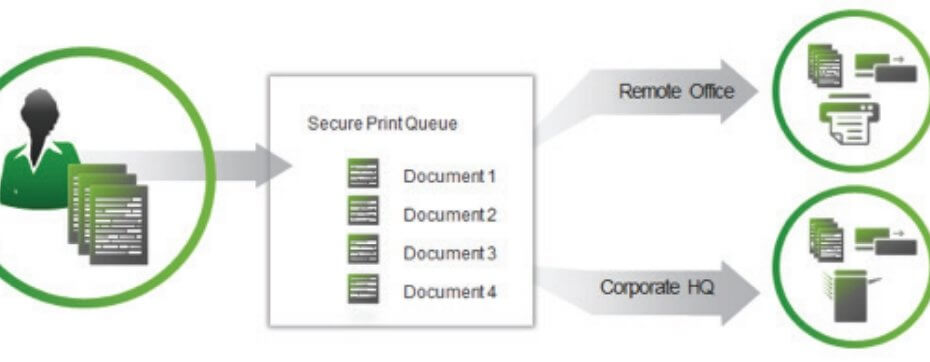
Equitrac Office keeps track of the copies printed and how much they cost. It gives insights on how to cut down printing costs. The software looks at each device and makes a report on any that print too much.
The Equitrac Embedded add-on for Sharp OSA®-enabled MFPs gives you complete control over your copy, scan, and fax expenses.
Pros
- The platform is user-friendly and easy for novice users to use
- It reduces waste by only letting authorized people use office equipment
- The tool prevents critical materials from remaining unclaimed at remote printers
- The dashboard offers easy report management
- It offers increased security by limiting access to document production
Cons
- The tool is suitable for large organizations
- Setting up the tool can be difficult
Equitrac Office is not free, so you must buy a license if you want to use it. The software works with Windows 10, 8.1, 8, 7, Vista, XP, Server 2008-2012, and SQL Server 2008-2012.
How do I monitor printer usage?
The procedures to monitor your printer usage will depend on the tool you use. Before installing a printer monitoring tool, check the printer’s built-in tracking features.
If the available features are insufficient for proper printer monitoring, install printer monitoring software on your PC. Check the printer’s log files and use a network monitoring tool to conduct periodic audits.
Wrapping up
All the software on the above list is reliable organizational printer monitoring options. You can use any of these applications in your home office, at your place of employment, in publishing firms, copy shops, or any other business setting.
What do you think about the tools above? Do you have more tools you’d like us to recommend above? Share your thoughts in the comment section below.