Category: category_2970

  • 5 Tools To Encrypt and Protect your Data on USB Flash Drives

    Privacy and security is a hot topic these days and users have to be very aware about the dangers of being too open with their personal files and private information like passwords and logins. This is especially so if you use one of those fantastic little inventions, the USB flash drive. Because of their portability and huge capacities, you can store lots of data and information on one and easily mix ordinary files with files that should not be open to anybody else who accesses to the drive.

    A few do, but many USB flash drives don’t come with any form of protection or security at all and because a USB drive can easily be lost or stolen, your data could end up in the wrong hands. There’s a few things you can do to make your flash drive data more secure, one is encrypting the data itself and then you can also hide the encrypted data so nobody else even knows it’s there.

    Here we show you 5 tools that can encrypt your files and also offer a bit of added protection by hiding the files on the flash drive.
    (more…)

  • 2 Tools to Detect Problematic Drivers causing Audio or Video Streaming Dropouts

    While most people will think that only old computers would suffer from lag in streaming audio or video in real time due to the slow hardware not able to cope up with the requirements of the operating system and software, new computers with a clean Windows can also experience such problems. When a dropout occur in an audio or video application that requires real time processing, one of the possible cause is the third party drivers of a device being implemented improperly and causes excessive latencies of Deferred Procedure Calls (DPC).

    If you know that device drivers can cause such problems, it is quite easy to solve the problem by using the trial and error method. You will just need to disable one driver at a time from the Device Manager which can be launched by typing devmgmt.msc in Start menu. Fortunately the Windows operating system only allows you to disable devices that are not essential for your computer to function. So it is safe to go ahead and disable devices one at a time while the audio or video streaming program is running.

    disable device driver

    If the dropout stopped occurring after disabling a specific device, then you have found the culprit. To have a better confirmation on the dropout problems, there are third party software that can detect the dropouts and even to the extend of showing which possible device is the cause.
    (more…)

  • 3 Ways to Add Classic Menus and Buttons to Microsoft Office

    Microsoft is well known for making major changes to its products which its customers seemingly didn’t want or ask for, Windows 8 being a recent example of something with many sweeping changes that proved to be controversial. But before that, another big alteration to a product line was with Microsoft Office 2007 and the introduction of the Ribbon user interface. People couldn’t at the time get their heads around the completely different way of showing the most used options which were previously in the form of easy to understand buttons and menus in Office 2003.

    Even today, many people still do not get on with the Ribbon interface of Office, even though Office 2010, 2013 and even the new 2016 still use an updated version of the ribbon instead of traditional buttons and menus. While this isn’t a problem to some, others like the familiarity of the old UI and work better when they know where everything is. Sadly Microsoft completely removed any option of having the old menus and buttons interface available in its Office products, from their point of view it’s Ribbon or nothing.

    It’s now down to third parties to help revive this functionality and thankfully a few of them have released products that help you do it. Some are free and some aren’t so you need to decide what suits you best, here we show you some of the free options available.
    (more…)

  • 8 Tools to Wipe a Hard Drive Before Selling or Lending It

    A lot of computer users will know that when you delete a file, it isn’t actually completely gone from the system and can often be recovered with a simple piece of data recovery software. This fact is especially important if you are giving away or selling an old computer system / hard drive, or just letting someone borrow an external hard drive or even USB stick because the other user could easily recover data you thought was gone, posing a major security risk.

    Even a format and reinstall of the operating system in that situation still doesn’t mean all the old data is completely safe from being recovered by others. The same thing applies to external storage media like USB sticks or memory cards, and these are perhaps more important as they are far more likely to change hands than internal devices.

    What you can do is make sure that before a hard drive, SSD or USB stick goes to somebody else, temporarily or permanently, any data that you don’t ever want to be read by others or recovered from these devices gets wiped clean and cannot be retrieved. One way is to wipe the free space on the drive meaning only those files currently visible can be viewed. Another way is to completely wipe the drive or partition clean so no data at all is left on it and nothing at all can be recovered. Here’s a selection of tools that can perform this task and wipe a hard drive clean making it more secure before it leaves your possession.
    (more…)

  • 5 Tools to Test CD or DVD Readability by Running a Surface Scan and File Test

    It’s probably a safe bet that most people who use a computer have come across a CD or DVD that refuses to work properly. If it’s a movie or music, it will probably skip and jump around or get completely stuck during playback. When trying to play a game or read data from the disc you might get a simple error in Windows that the disc cannot be read. Although many users still think CD and DVD discs are pretty much indestructible and last forever, they do in fact degrade over time and have a limited lifespan.

    You can also get similar problems if you are burning discs yourself and the media is of poor quality or the data is being burned too quickly for the media to handle. It’s also common for things like fingerprints or scratches to stop disc contents being read properly, maybe even the ROM drive you’re using is the problem and you don’t know. Just like your hard drive in your computer needs to be checked from time to time for errors, it’s useful to be able to scan a CD or DVD to verify the disc is in good condition and all of the data contained on it is completely readable. Here’s a selection of 5 different tools that can help you check the readability of your media. All tools were tested on Windows 7 64-bit and will also work on XP/Vista/8.
    (more…)

  • 8 Free Tools to Test Read and Write Speed of USB Flash Drives

    Whenever you buy a new piece of computer hardware, whether it’s a CPU, memory, hard drive etc, one of the factors that will help to determine your purchasing decision would be the performance of the component. With hard drives and SSD drives, you will be looking at capacity and read/write speeds, and it’s a similar story when you purchase a removable memory card or USB flash drive.

    Apart from having to worry about USB drives being the full capacity and not being fake if you buy from somewhere like eBay, the performance of a flash drive can vary by massive amounts depending on manufacturer and the type of memory used. If you buy a slow USB flash drive with a high capacity, it could literally take hours to fill it up completely.

    But if you already have some USB flash drives in hand, do you know how fast they actually are at reading and writing? A drive that only writes at 5-6MB/s could take a while to copy large files like movies, whereas a fast USB3 flash drive could do the same copying tasks much faster. Here’s a selection of 8 free tools to benchmark your USB flash drives or media cards to give you an idea of how fast they are.
    (more…)

  • 5 Freeware to Create Jukebox Server and Stream MP3

    Music is important to most people because it can affect the mood or emotion of a person and also has the ability to create an atmosphere depending on the genre that is being played. This is why you can find the ability to play music on almost every device such as on your computer, TV, phone and etc. Most likely you already have your own playlist with your favorite songs that you’ve spent years compiling but the biggest challenge is to be able to access them from any computer or device.

    Although there are already some cloud services such as Google Play Music and iCloud that let you store your entire music collection to be streamed online, you may want to setup your own audio streamer from your PC if you prefer the files to stay on your computer without storing them on remote servers.

    Here we have 5 free software that can turn your computer into a music server where you can access your music without uploading to any third party.
    (more…)

  • 2 Tools for Visitors to Download Images in Bulk from SmugMug

    SmugMug is one of the most popular paid photo sharing and image hosting websites. A lot of professional photographers use SmugMug to host their photos because it is easy to use and saves them the trouble from creating or managing their own website. A lot of useful features can be found on SmugMug ranging from simple basic settings to powerful smart gallery feature by dynamically adding images to a gallery based on keywords or other criteria. The images that are visible and accessible by visitors can also be downloaded but it’s limited to downloading one image at a time.

    SmugMug has never made it an option to allow visitors to automatically download multiple images. If you want to bulk download the whole gallery, the official solution is to request the owner of the gallery to generate a ZIP file containing all the images in the Organize area in SmugMug and send you the download link when its done. There used to be quite a few third party software tools that can batch download all images from a gallery in SmugMug but unfortunately most of them no longer work after SmugMug switched to a new platform in 2013.

    After testing, there’s only 2 tools that are left for visitors to download pictures from galleries hosted in SmugMug.
    (more…)

  • 7 Ways to Monitor Shared Folders For Who Modified or Deleted Files

    One of the biggest problem of sharing of folders in Windows XP is it uses the Simple File Sharing option by default whereby when you share a folder, anyone on the local network or even from the Internet would be able to access the shared folder without logging in or entering any password. Thankfully this has all changed starting from Vista where the Simple File Sharing option has been removed and you need to login with a user account or else you can’t access the shared folder. It is still possible to allow access to shared folders without a password by enabling the Guest account and giving permission to EVERYONE group on the shared folder.

    Another problem with shared folders is sometimes you don’t know who is toying around with the files when a few people have access to it. If you go to Control Panel > Administrative Tools and run Computer Management, you can only view the connected session and the files being opened by the user in real time but without notification nor logging. This means an important file can be easily deleted from the shared folder and untraceable. Fortunately we have 7 ways for you to monitor shared folders to track down the culprit.
    (more…)

  • How To Make a Non-STEAM Counter-Strike: Global Offensive Server Using RevEmu or LumaEmu

    According to the official game and player statistics from STEAM, the number of players for Counter-Strike: Source has dropped drastically while the latest Counter-Strike: Global Offensive is the 2nd most played STEAM game after Dota 2. The combination of STEAM players from CS1.6 with CS:S merely takes up 10% of CS:GO. This clearly shows that Counter-Strike: Global Offensive is currently the more popular game in the Counter-Strike series.

    counterstrike player statistics

    Installing and running a dedicated CS:GO server is not difficult while the most challenging task is actually getting enough players to join and play in your server as long as possible or else it would be an empty server without players. One potential way to attract more players to your server is to accept (pirated) non-steam players because the Setti Masterserver statistics shows that there are more CS1.6 and CS:S non-steam players than the legitimate Steam players.

    In this article, we’ll show you how to download and install a Counter-Strike: Global Offensive server in Windows. After installation, you can proceed to configure it to accept non-steam players.
    (more…)

  • Fix Microsoft Office Word Has Not Been Installed For The Current User Error

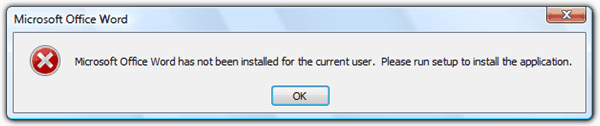
    Recently Microsoft came up with some updates that caused many users to get an error message saying “Microsoft Office Word has not been installed for the current user. Please run setup to install the application.” when you try to run it. After clicking the OK button, Microsoft Word closes. You’ll also be getting the same error message if you try to run any of the other office components such as Excel, Publisher, Access, Outlook etc. The worst part is uninstalling Microsoft Office and re-installing wouldn’t help to fix this problem. Before doing the above, you should at least use the official Microsoft Office Diagnostics tool to check if it has detected any other known problems.

    Microsoft Office Word has not been installed for the current user

    There’s a Microsoft Knowledge Base article on this issue and the solution is to give EVERYONE full control of the Opa11.dat file. Unfortunately this solution would only help to fix the problem when the non-administrative user accounts on the computer do not have permission to modify specific files that are used by the Office 2003 Setup program or the Office XP Setup program.
    (more…)

  • How To Rotate Your Monitor Screen Display

    Did you know that most newer computer display adapters allow you to rotate your monitor’s display? Rotating your screen is not something that we normally do because our monitor sits the way it is and we don’t move them upside down. However, this is something that is more common these days because multi monitor setups are sometimes needed for professionals who perhaps need an extra portrait oriented display for their work. Some monitors can actually give you the option to rotate the display 90 degrees for this very purpose.

    If you think about it, reading books or documents on your screen is probably more natural when viewed in portrait mode. Books, magazines, printed documents and eBook readers like the Kindle are all oriented in this way. You won’t find much at your local library which you can read in a landscape view. A lot of people have netbooks such as EeePC nowadays because they are small and portable. You might consider rotating the screen so that you can read PDFs, eBooks and other documents in A4 format more comfortably and thereby turning the computer into an eBook reader.

    Rotate your screen and monitor

    For most displays, it’s pretty easy to rotate your viewable area by 90 degrees and switching between landscape and portrait views. Also, if you have a computer attached to a projector, the default view will most likely be upside down, so you will need to rotate your screen 180 degrees to get the image the right way up.
    (more…)

  • 2 Ways to Convert REG to EXE, BAT, VBS and AU3 to Bypass Registry Editing Restriction

    A lot of Windows and even third party software settings are stored in the registry. Editing the registry is mostly performed by advanced users rather than beginners because wrongly deleting or changing an important registry value can result in an unbootable Windows. This is why it is always good to backup the whole branch of the registry that you want to edit by using the Export function. The exported registry file will be saved as a .reg extension. Importing back the exported .reg file is as easy as running it and clicking the Yes button on the scary warning window that says “Adding information can unintentionally change or delete values and cause components to stop working.”

    Since registry editing is not really meant for computer beginners, there is a DisableRegistryTools setting in the registry that prevents the user from launching regedit and the command line reg.exe tool. This will also effectively block the ability to import a .reg file. This restriction is useful in a corporate environment to prevent users from messing up their computers but malware also uses this method to prevent the not-so-advanced user from attempting to disable the malware from the registry startup locations.

    A simple way to bypass this restriction is to convert the .reg file to other file format such as .exe and .vbs. Here we have 2 freeware tools that can assist in converting .reg file to various formats including batch (.bat) and AutoIt script (AU3).
    (more…)

  • 4 Methods to Reset System and Hidden Attributes for Files or Folders Caused by Virus

    Different viruses cause different types of damage on your computer. Most of the time, the viruses are programmed to disable Windows Task Manager, Regedit, Command Prompt, folder options and etc. These restrictions are meant to prevent a normal computer user from using these built-in Windows diagnostic tools such as MSCONFIG to disable the virus from starting up on your computer.

    There are some viruses that will cause destruction such as encrypting recently used files so you are forced to buy the decryption key from the virus programmer. Then there’s another type of virus such as BDS.Mirc.Backdoor that will hide your document files by setting the hidden and system attributes to the file. You can still see the files if you set to show hidden files and folders plus disabling hide operating system files. Another trick is to use Google Chrome, Firefox or Opera to reveal the hidden files. If the virus is capable of restricting Folder Options, the chances are you think that your files have been wiped out by the virus but in fact they are perfectly safe and have just been hidden in your system.

    hidden attributes grayed out

    There’s still hope if you think that your files are gone because of a virus. Here’s how to check if the files are still around, and if they are, you can reset the attributes of the files to view them normally in Windows Explorer again.
    (more…)

  • 6 Video Players That Can Play Two Subtitles At The Same Time

    In some areas of the world, you might see more than one set of subtitles on a cinema screen at once. This is because the country might have more than one major language so just showing one subtitle language isn’t enough. This becomes a problem at home as DVD/media players and TVs cannot display more than one subtitle at once on discs or when playing video files and you would have to encode the subtitles you want into the video itself.

    Thankfully, this doesn’t have to be the case on a computer and it’s quite easy to display two subtitles on a video at the same time if you have the right media player software to allow it. Here we show you six solutions for playing two subtitles on your Windows computer. All you need is the video file and the required language SRT subtitle files or subtitles embedded inside the video file.

    Tip: For best results, you should rename subtitle files to something like nameofvideofile.language.SRT. For instance, Myvideofile.eng.SRT. Then put the files in the same folder as the video. This way, most media players will automatically detect the subtitles without you having to manually load them. Also, make sure your subtitles are synced correctly or they will display at different times.
    (more…)