Category: category_2990

  • Disable Remote Desktop Auto Lock Screen on Idle

    I often use the Windows Remote Desktop function to connect and remotely manage another Windows server. As you might know, there are many other better remote control software such as the free Virtual Network Computing (VNC) or even the popular Teamviewer, but I try to minimize the installations of third party software on the Server machines. If you don’t know what Remote Desktop is, it’s a protocol developed by Microsoft which allows you to view the display and control the mouse and keyboard of another computer at different location, as if you were sitting in front of the computer.

    remote desktop auto locked when idle

    I never have any problems with Remote Desktop and it works as I expect it to, except for only one annoyance which is if I leave it idle for a few minutes, it auto logs off and I have to re-enter the password to login again. This is very annoying whenever I am reading the log files or the console messages that are displayed on screen. Fortunately there is quite a simple solution for how to disable remote desktop auto logoff on idle.
    (more…)

  • 10 Tools To Install Windows Faster Using a USB Flash Drive

    Not too many years ago, before the USB stick came along, if you wanted to clean install Windows, it had to be done using the CD or DVD and an optical drive. Thankfully, things have moved on and users with a sufficient amount of knowhow have been able to get their copy of Windows onto a USB flash drive and install from it for a little while now. With the introduction of Windows 8 you can now even choose to install it using a USB flash drive from within the Microsoft Upgrade Assistant.

    Installing Windows from USB has some advantages such as not having to worry about scratching or damaging the Windows installation disc, and it’s more convenient to carry around a tiny USB flash drive than optical media. They are also a necessity for netbooks, small laptops and the increasing amount smaller form factor PC’s that no longer use ROM drives. And to add to that, a reasonable speed USB stick can complete a Windows install a good bit quicker than an optical drive thanks to the much faster access times.

    Here we list 10 ways to enable you to get your Windows install files onto USB flash drive taking advantage of the benefits it has to offer. For ease of use, we have listed which versions of Windows are supported for putting onto USB according to each tool’s author. The tools themselves should run on Windows XP to Windows 8. Make sure you have at least a 4GB USB flash drive to hand before trying to perform a Windows to USB, portable versions of the software were used where possible. If you don’t have one, you can directly download a Windows 7 ISO from Microsoft’s Official Distributer.
    (more…)

  • Make Windows 7, 8, 10 and Vista 32-bit (x86) Support More Than 4GB Memory

    As you’ll know, there has been 2 versions of each Windows starting from XP which are 32-bit and 64-bit editions. Sometimes a Windows 32-bit is referred as x86 and 64-bit as x64. We won’t go into details on what are the differences between x86 and x64 are, but one of the major differences is a 64-bit Windows can support more than 4GB of RAM. If your computer has 4GB of RAM and you’re using a 32-bit Windows, you’ll notice that only about 3GB – 3.5GB is being recognized and the remaining memory is gone. Weirdly, Windows 2003 and 2008 can already address more than 4 GB of memory so why can’t we do that with Vista and newer operating systems?

    The answer is: Microsoft doesn’t want that and it’s all just a licensing matter. Contrary to popular belief, there is no physical reason why a 32-bit Windows cannot access memory above 4GB, but it’s more a case of Microsoft opting not to allow it. Read the findings of software analyst Geoff Chappell to find out more.

    Install Memory 3.5GB

    We can of course go for a 64-bit version of Windows, but even today, there is still quite a lot of software which cannot run properly on x64, which can be inconvenient if you’re someone like us who installs and tests a lot of software. Not only that, Windows 64-bit doesn’t accept unsigned drivers unless you disable driver signature enforcement manually every time you boot. Quite frustrating… Well, here is good news for Windows 8, 7 and Vista users because we have some patches here to make your 32-bit Windows support more than 4GB of memory.
    (more…)

  • 3 Tools to Backup and Restore Windows 7 and Vista OEM Activation License

    Many people aren’t aware that a pre-built computer from a manufacturer like Dell or HP actually has two Windows product keys present, and the key on the Windows COA sticker isn’t actually in use. What your computer is shipped and installed with is a generic OEM product key that is the same on every computer that comes from the same manufacturer with that edition of Windows. You can test this yourself by using a product key display tool, the license it displays will not be the same as what’s on the attached sticker.

    Unfortunately if you perform a clean install of Windows you cannot ordinarily use this generic key and will instead have to use the one from the COA sticker. To prevent pirates easily using the key, measures are in place to make sure it only works on computers built by the manufacturer. Firstly, each computer has data added to the BIOS identifying the manufacturer. Secondly, a security certificate is installed into Windows which checks that identity in the BIOS and accepts the generic key. If the BIOS, certificate and key all match up, Windows will activate without the need for the internet or a phone.

    windows is activated

    Many computers that came with Windows Vista and 7 will be getting old and if you still have the original install that came on the computer, you may be thinking about a reinstall as all Windows installs degrade and slow down over time. While you can use the product key from the sticker attached to your computer, after all this time many of those stickers will now be hard to read or the characters have rubbed off completely making the key unreadable.

    Thankfully there are ways to backup the OEM license key and certificate from a current Windows install and then transfer them onto a completely clean installation.
    (more…)

  • 3 Methods to Recover Windows Product Key from Dead or Unbootable Windows

    If you’re a computer technician or the neighborhood tech geek, quite frequently you could find yourself having to reinstall Windows for people. One very common and annoying problem that often arises is the user doesn’t have their Windows license to hand and you have to spend time in retrieving the genuine Windows product key from the system if the hard drive is readable. A big pain these days is Windows product key stickers on many machines such as laptops and netbooks are paper and don’t have the plastic protective coating meaning the key can easily become faint and impossible to read accurately.

    There are a few ways to retrieve a key from an unbootable computer and most of them involve having access to another working computer. For example, taking out the hard drive and attaching it to a working machine, running a tool that can read product keys, load the registry hive from within the program and retrieve the product key. Or you can boot up PCRegedit, load the registry and then decrypt the key from a working computer. All those steps work but are a bit fiddly and time consuming.

    We’ve tried very hard to look for a linux live CD that can retrieve the license key but couldn’t find an obvious one that doesn’t involve a long process. But thankfully there are other ways you can do this by using very popular Live Windows CD’s that can get the key from a Windows system that cannot boot.

    Special Note: An important thing which needs mentioning is there are 2 different types of Windows product key you might have installed on your system. If you have an OEM machine made by a manufacturer such as Dell, Sony, Asus etc, and have never re-installed Windows, your product key will be different. This is a special generic key pre-installed at the factory and is NOT the same key as the one on a genuine sticker and cannot be used on a standard Windows re-install. If your key is from a sticker or has been typed in manually, these methods will work fine.
    (more…)

  • Disable Third Party Services and Programs for a Clean Boot in Windows

    There’s a multitude of things that can go wrong with the Windows operating system. From serious issues like blue screens of death and operating system not found errors to more general problems of software causing instability or malicious programs and spyware which are making the system misbehave. Users often run several security applications at once which sometimes don’t like each other and the problem can stem from that. Sometimes it could be a Windows issue but often third party software is the cause of the problem.

    A good way to troubleshoot problems if you don’t know the exact cause is to disable everything that starts with Windows so just the operating system itself runs, like what Safe Mode does. The problem with Safe Mode is it disables almost the entire operating system and only runs the absolute bare essentials to get a boot, that sometimes isn’t so helpful and you will need to boot Windows as normal but just disable all third party software to try and find the root problem.

    A lot of the time when seeking help from the internet you will be asked to perform a “clean boot” of Windows. This simply means preventing all non Windows programs and services from starting so the system is running more cleanly and no third party software is launched on boot. Here is how to perform a clean boot of Windows with a few extra options for making sure normal booting is as clean as possible.
    (more…)

  • Transfering Files From Local Computer to Connected Remote Desktop Session

    It’s quite easy to transfer files between computers on the network, all you have to do is select the folder to be shared and other users can find and connect to that folder and the files inside. If you use the Remote Desktop Connection feature in Windows you can even gain control of the remote computer, find your shared folder from it, and then transfer files between the two computers as required.

    Windows Remote Desktop actually has a feature built in that allows you to share any of the local drives on the host computer with the remote computer without having to manually share specific folders or drives. This is far easier and can be more secure because folders are not being shared permanently but only for the life of the Remote Desktop session.

    Here we show you how to setup your Remote Desktop session to share some or all of your local drives.
    (more…)

  • Disable F8 Key and Boot Options to Block Access to Safe Mode during Windows Startup

    Whenever Windows is not working properly, most of the time the first thing that knowledgeable users will do is boot the computer into Safe Mode and see if the problem still persists. If Windows will only boot into safe mode and not normal mode, then typically it has a major problem such as disk corruption or the installation of poorly configured software or hardware driver that prevents the operating system from successfully booting normally. Windows in safe mode will have reduced functionality, but the task of isolating problems is easier because many non core components are turned off.

    Although Safe Mode is very useful for troubleshooting computer problems, it can also be used to bypass some security software that will auto start with a normal Windows boot. An example is if you installed an internet monitoring software which restricts or watches your children to use the computer at certain times, they can simply boot in to Safe Mode if they know how and use the computer the whole day. There are times when we need to disable Safe Mode for extra security.
    (more…)

  • Solution to Successfully Burned CD or DVD Shows Blank Content

    I went to one of my work places today and one of the lecturers told me that her desktop’s DVD drive is unable to read a lot of discs that have been burned by students. The drive will only show a blank drive with nothing in it. The disc are then tested on her laptop using VSO Inspector’s disc surface scan and it did not report any problems. Another way to test if it is a disc or drive problem is to insert an original disc such as the provided HP recovery disc to the drive and see if it reads or not. I did that and it was able to read and display all the files in the HP recovery disc.

    This case is pretty similar to a few comments that I get occasionally where users are unable to boot up antivirus rescue cds after burning them to disc. I don’t really know what is the cause of this problem but I always burn my disc at the “LOWEST” speed and never, not even once encounter a computer that cannot read the disc (Windows CDs and DVDs, Hiren’s BootCD, Antivirus Rescue CDs, Linux Live CDs, Windows PE, ophcrack LiveCD) that I burn. I am not saying that we MUST burn it at the lowest speed but there are some drives out there that are less sensitive and will have problems reading disc that are burned at the maximum speed.

    You must be thinking why are there such super fast DVD drive burner available today when we have to burn it at a low speed? Well it is just normal that computer hardware gets faster and bigger in capacity. The manufacturers couldn’t be releasing a slower drive right? So we have a “choice”, to either record our disc in a faster or lower speed.
    (more…)

  • Fix for Blank or Empty Windows Features List in Vista and 7

    If you’ve uninstalled a program in Windows Vista or 7 from Control Panel, perhaps you’ve noticed “Turn Windows features on or off” in the left pane. When you click on it, the Windows Features dialog will appear asking you to “Please wait” and it will start searching for a list of windows features such as games, indexing service, internet information services (IIS) and other system components that you can turn on or off. Vista and 7’s Windows Features list is actually pretty much the same as Add/Remove Windows Component in Windows XP. You can also run Windows Features by typing “optionalfeatures” at the run dialog or command prompt.

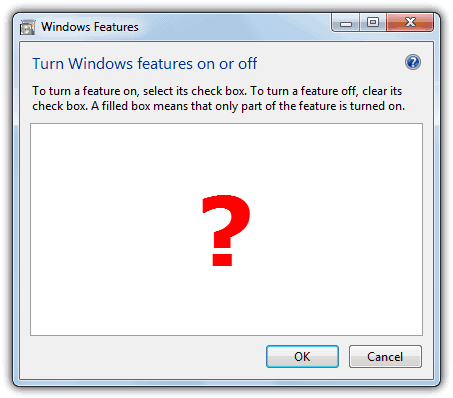
    One of the most common problems that many people are facing with the Windows Features dialog is the window comes out empty or blank and the features list doesn’t appear. You can see “please wait” initially as it tries to make up a list but then it totally blanks out.

    Blank or Empty Windows Features

    Microsoft of course is well aware of this problem and they’ve created a knowledge base article 931712 to acknowledge the problem and also provided 2 solutions to resolve this issue. The first method is to run the sfc /scannow command to scan all protected system files and replace incorrect versions with the correct Microsoft versions. If that didn’t work, they recommend a System Restore.
    (more…)

  • 5 Ways to Solve Error While Deleting Key Problem When Editing Restricted Registry

    Most advanced users know all about it, but if you didn’t know what the Windows registry is, it’s a several megabyte database that stores most of the information for your Windows operating system. It contains thousands of configuration settings for Windows itself, third party software, hardware and preferences for the individual users on the computer. Editing the Windows registry can be dangerous if you don’t know what you’re doing because if you wrongly delete an important key, Windows might not be able to boot up the next time.

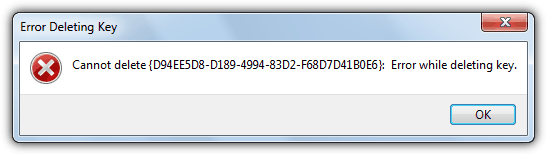
    So no matter how confident and experienced you are, it’s always a sensible idea to be a little bit safer and make a backup of the registry keys that you intend to edit, or even better, make a complete backup of the whole registry as well just in case. If you’re trying to edit or delete keys from the registry to repair or recover from certain problems, you might find that some keys won’t let you do anything with them and you’ll get an error such as “Cannot delete xxxxx: Error while deleting key”. These keys are usually protected to stop accidental deletion and it’s important you have the correct key before trying to change it.

    Error While Deleting Key

    You could also be the administrator on the computer, but still can’t manipulate the required key, which might sound quite odd. Even though the administrator account has a great deal of control, there are other hidden accounts and levels on the system which have even greater access and therefore standard administrator privileges are not enough. To solve this problem, you have to force the registry to allow the logged on user full control of the subkeys. Below are several different ways of performing this operation to give you the required access.
    (more…)

  • Connect Computers Together using Ad Hoc Wireless for Sharing the Internet and Files

    Most people have an internet router at home for connecting to the internet, many will have the added ability of sharing the network via a wireless connection as well. If you have a WiFi router within range it’s quite easy to connect your computer to it for using the internet and sharing files with other computers on the network.

    But if you don’t have a WiFi or even wired router close by it becomes trickier to connect two computers together, unless you happen to have a crossover network cable to hand.

    These days some cheap laptops are even shipping without ethernet ports so WiFi is the only option for connecting to the internet or another computer for file sharing, and a wired only router simply wouldn’t work. Luckily Windows has the ability to connect two computers together over a wireless connection and even allow you to connect to the internet as well as share files.
    (more…)

  • Restore Unbootable Windows System using Offline System Restore

    Every time you install new software such as applications, drivers, games, Windows updates and hotfixes onto your computer, changes are being made to the system files and registry. These changes are now and again not 100% successful and can cause problems. Sometimes an unstable piece of software or beta version, or even a Windows update can make your system misbehave and cause various performance or stability issues after installation.

    Since Windows ME, there has been the function built into Windows called System Restore that allows you to easily go back to the way the system was before the problem occurred. This gives users the option of repairing Windows files and registry settings quickly if they don’t have sufficient time or knowledge to look for solutions to any problems. If you’re able to boot into Windows, then using System Restore to set your computer back is easily achieved by going to Start -> All Programs -> Accessories -> System Tools -> System Restore, and then selecting a restore point from before the issues started.
    (more…)

  • Solutions to CD/DVD Drive Letter Missing from My Computer

    The usage of optical drives has slowly been on the decline for a while now. Partly because small form factor notebooks and hybrid devices are more popular and simply don’t have the room for a CD/DVD ROM drive, and also because mediums like USB flash and portable hard drives are cheap and can be used as a substitute to a CD or DVD to install software. For many of us, an optical drive is still vitally important, whether it’s for reading from and installing games, writing out your downloads, creating a music CD or making a backup of your system.

    Because it behaves just like any other drive attached to your computer, a ROM drive will show up in Windows Explorer and have an assigned drive letter. There is quite a common issue in Windows where the drive completely disappears from My computer in Explorer as if it has been physically unplugged or has broken down. Even Device Manager will tell you the drive is still there and functioning correctly with no exclamation marks to denote an issue.

    cd/dvd drive missing from my computer

    Before you consider replacing the ROM drive because you think it may be faulty, there are some simple solutions which nearly every time will get the drive back showing properly again in My Computer.
    (more…)

  • Easily Download and Install DirectX 10 for Windows XP

    As far as Windows gaming goes, Windows XP was probably left behind way back in 2007 when Vista was released. One of the main selling points of Windows Vista was that gamers simply had to upgrade because of the integration of DirectX 10 into the new operating system. Newer versions of DirectX bring audio and visual enhancements to gaming along with better performance, so if you’re a gamer, you really want the latest DirectX you can get your hands on.

    DirectX is tightly integrated into the operating system when installed so you can’t simply install DirectX 10 or 11 on XP because it won’t work. Although we’re now on DirectX 11 for Windows Vista, 7 and 8, and the next Windows will probably come with DirectX 12, Windows XP is stuck on DirectX 9 which is now over 10 years old. Some games are not made to be backwards compatible with DirectX 9 either these days and you just can’t play the game, whether your graphics card fully supports DirectX 10 and 11 or not.

    microsoft directx 10

    So what do you do if you want to use DirectX 10 on XP but it was never officially released by Microsoft?
    (more…)