Category: category_2990

  • 8 Free DNS Services to Block Porn Sites without Installing Software

    There are various ways to try and stop inappropriate online content like pornographic material being accessible to children, one is to install parental control software. The software can be effective at blocking this type of material up to a point but can be messed with or bypassed. Another option which doesn’t need any software installed on your computer is filtering content through the Domain Name System (DNS).

    DNS is a set of online servers that translate standard website names into their corresponding IP address which the browser needs to show the website (for raymond.cc it’s 142.4.51.106). It’s like a huge Windows HOSTS file with billions of entries. ISPs generally use their own DNS servers which will be the default for all devices using your internet connection. However, they are not always that fast, private or secure.

    dns lookup name server

    There are many third party DNS services that can filter out specific website addresses, like ad hosting, malicious content, illegal content and of course, adult or pornographic content. Here we show you eight free DNS services that offer adult or pornographic content blocking as standard. All you have to do is add the DNS addresses to your Windows network properties. Instructions are supplied on the specific websites if you don’t know how to do it. IPv6 addresses are also included for more advanced users.
    (more…)
  • What is INFO2 File Hidden in Recycled or Recycler Folder?

    Most of us know what the Recycle bin does and how to use it, and its internal workings have changed subtly over different Windows releases. Windows Vista and above now use meta data information to store the selected files and folders in a recycle folder called $Recycle.bin before being permanently deleted. Windows XP and below users will have differently named recycle folders on their drives called either Recycled or Recycler. What’s the difference between the Recycled and Recycler folders?

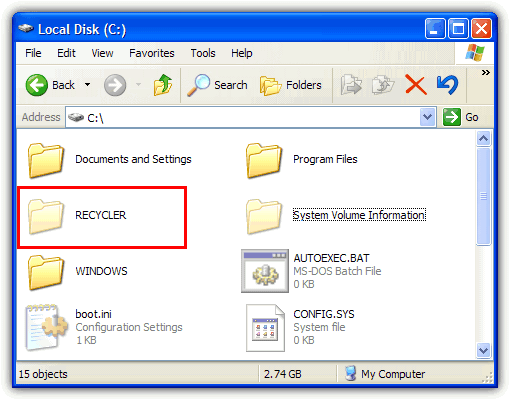
    In fact, they have no real differences and you will have have either folder at the root of your drive. What determines whether you have Recycled or Recycler is actually due to which filesystem is present on your hard drive. If it’s a FAT32 Windows partition, you will get Recycled and if you have NTFS, you’ll have Recycler. Some people might even have both of the folders because they’ve previously converted their drive from FAT32 to NTFS. Likewise, it’s not uncommon for users of Windows 7 or 8 to come across Recycler on an external hard drive which has previously been plugged into a system running XP.

    recycler folder in the c drive

    When you delete a file in Windows XP’s Explorer or My Computer, the file immediately appears in the Recycle Bin. This is what you see, but actually there is something going on in the background. The complete path and file or folder name is stored in a hidden file called INFO2 which is inside the Recycled or Recycler folder. This file is very important because if INFO2 becomes corrupted or removed, normally anything currently in the recycle bin could be lost lost unless you try to use a piece of data recovery software to get it back.

    Let’s do a small test to understand better what happens.
    (more…)

  • How to Repair Windows 7, 8 or Vista Without the Install DVD

    Back in 2006 when Windows Vista was introduced, it came with a brand new feature that is able to burn what’s called a “System repair disc” onto a blank CD. While it isn’t a disc full of utilities that can help you fix a huge number of issues such as the great Hiren’s Boot CD is able to do, there are number of functions built in that can do the basic tasks. These include helping a system with startup issues to boot, enabling you to run an offline system restore, a command prompt where you can use tools such as Diskpart, run the Windows memory diagnostic and restore a full system image backup if your installation is beyond repair.

    What’s good about this tool is it’s available in all versions of Windows Vista, Windows 7 and also Windows 8. These same functions are also found on the Windows Install DVD that is used to install the operating system, so you don’t necessarily need to have a repair CD if the install DVD is to hand. The problem with this though is if you own a branded computer or laptop such as Acer, Dell or HP, the chances are they only provided you with a recovery partition or a recovery DVD without the proper Windows DVD. In other words, you need to make your own system repair disc through Windows.

    the system repair disc main options

    A simple scenario where a repair disc would be useful is if you decide for whatever reason that you want to install Windows XP as well as your current Windows. It’s easy to install Windows XP on a system with Windows 7 or Vista installed, but XP would overwrite the current bootloader making only the XP installation bootable. The system repair disc would be able to reinstall the correct bootloader to make all operating systems bootable.
    (more…)

  • Windows Requires Administrator Rights to Install USB Flash Drives

    USB flash drives are now the dominant hardware storage devices if you want to quickly transfer data from one local computer to another. They’re cheap to buy, are available in multiple sizes and are more rapid than ever thanks to USB3. The good thing about a flash drive is it’s also plug and play so you just insert it into your PC or laptop and Windows does the rest. Flash drives can also be quickly unplugged although it’s always less risky to remove storage devices safely.

    When you insert a USB flash drive into your computer for the first time, Windows will automatically load the default USB Mass Storage device driver for it so you don’t have to install third party drivers from CD or the internet etc. After a few seconds Windows will say the new device has been found, drivers installed and it’s ready to use. There is an annoying error that can occur at this point which is Windows will ask you for the administrator username and password to install the device, it will say:

    You must be a member of the Administrators group on this computer to install this hardware

    member of administrators group to install

    Although this might not be such a surprise if you’re running a limited account because limited users cannot install third party device drivers by default, it shouldn’t appear if you are already the administrator on the computer. This seems to be an issue confined to XP and we’ve heard no mention of it happening on any other operating system.
    (more…)

  • How To Perform a Repair Install of Windows XP

    One of the features Windows XP introduced is the Repair Install option which in the event of a major PC crash allows you to keep your personal data while the core Windows files are replaced hopefully allowing the PC to get back up and running. A Repair install is not the same as a re-install or a clean/fresh install, a couple of other phrases you may have heard. A re-install usually means wiping the current operating system off and putting it on again, a clean/fresh install can also mean that but is more commonly used when Windows is being installed onto a drive or partition for the first time.

    The good thing about the XP Repair install feature is it won’t delete your personal files, installed programs, personal information or settings, it simply attempts to repair the operating system by replacing its own files. The repair feature is very useful when the operating system files have become too corrupted to fix but is something to be used only as a last resort. If this fails, your next step would probably be a format and complete re-installation of Windows XP.
    (more…)

  • How To Remove Shared Documents or Public Folders from My Computer and Explorer

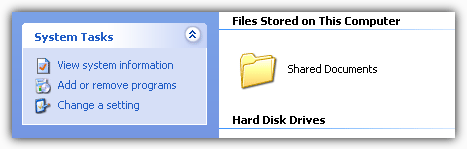
    Everyone with a Windows computer will have opened My Computer in Windows XP or Computer in Windows Vista, 7 or 8 at least once during their lives. And some may have wondered what some extra icons are doing there. In XP when you open up My Computer you’re greeted with a folder icon called Shared Documents and a lot of people have no idea what it actually does.

    Shared Documents folder

    In the newer operating systems of Vista and above you don’t get this because it’s got a different name and you don’t get a folder in the same window as your drives, but a similar thing still exists and is present in Windows Explorer. In Vista, 7 and 8 the function is called Public folders and is pretty much the same thing. But some users may wonder what it does and why is it there if you don’t use or need it.

    Shared Documents or Public folders and all their sub folders provide a place for you to store documents, pictures, video and music that users of different accounts on your computer can access. For instance, if you have an account for each member of your family, one user cannot read the contents of another users Document folders even if you want them to access files in there. Place the files in a Public or Shared folder and they are accessible to all users. This is also the case for other computers on your local network which can also make use of these folders.
    (more…)

  • Identify What is Loaded with rundll32.exe in the Windows Task List

    One of the problems when you’re trying to diagnose any problems in Windows, is quite a lot of information about what files and programs are loaded in the background is hidden away and not readily visible. One of these Windows programs is the svchost.exe process which just looks like a single process in Task Manager, but in fact can contain several dll loaded services which you won’t know about unless you know how to identify what’s inside the svchost process.

    Another process that might be showing in your Windows Task List but you can never know what it is will probably be the rundll32 process. Rundll32.exe is a part of Windows found in \Windows\System32 and used to run program code in a dll file as if it was an actual program. The dll file can’t be executed directly, that’s why the rundll32.exe is required to to run it.
    (more…)

  • Fixes for AutoPlay Dialog Box Not Appearing When Plugging in a Removable Device

    Whenever you plug a removable device such as a USB flash drive or hard drive into your computer, the default action in Windows will pop up a dialog box asking what you want to do with the newly inserted device. This is known as Autoplay and will give you options such as playing a music CD, watching a DVD, burning a blank disc or simply opening the drive in Windows Explorer to name a few things. There are many more options available and 3rd party applications can also add to this to give even more options.

    By default Windows will allow the Autoplay feature to pop up on all drive types apart from those recognized as network drives or any which it can’t correctly identify. This includes any removable drives (USB flash etc), fixed drives, RAM disks and CD-ROM (CD/DVD/DVD-RAM/BD-R) drives that are inserted. Sometimes though, this function might not show when you want it to because of a problem with Windows or a piece of 3rd party software has changed the settings without your knowledge.

    autoplay in windows

    If you want to get this back when you plug in a device such as a USB stick, it can range from a simple fix to something a bit more difficult such as some wrong registry settings.
    (more…)

  • About $Recycle.bin, Recycler and System Volume Information Folders in Windows

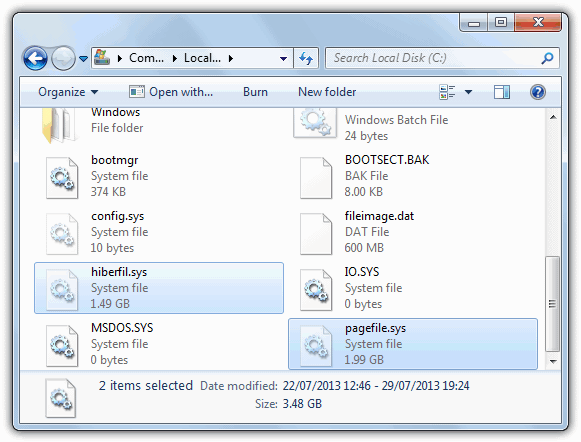
    As you might expect, there are many files and folders hidden away in Windows that deal with important tasks such as keeping the system running or allowing certain features to function. A couple of examples of this are Hiberfil.sys and Pagefile.sys that reside in the root of your C drive.

    You have to enable the show hidden files and protected operating system files settings in Control Panel Folder Options for these and other files to become viewable. More folders in the root of C which also become visible after unhiding are $Recycle.bin or Recycler and System Volume Information. But just what are these folders for?

    The first thing about hidden files and folders in general is that they’re usually not made visible for a reason, which is often a sign that you’re not supposed to play around with them. But also, like many things in Windows, if something isn’t behaving correctly or the behaviour looks odd, you might want to have a closer look.

    What is System Volume Information folder

    So what are the $Recycle.bin, Recycler and System Volume Information folders all about?
    (more…)

  • How To Access Send To Folder in Windows 7 and Vista

    If set up to your preference, the Windows Send To menu can be a very useful addition to Windows Explorer. This feature has been around since Windows 98 providing a convenient way for Windows users to easily perform simple file operations and send files or folders to other locations such as the Desktop and Documents folder, third party applications, and even to other drives or devices via Bluetooth or CD/DVD writers. A few default locations are provided such as Compressed (zipped) folder, Desktop, Documents, Fax recipient, Mail recipient and attached drives that you can send to, and these options will likely grow after installing third party applications.

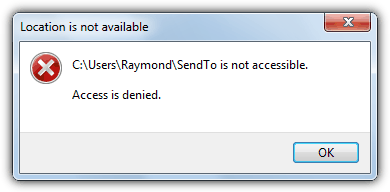
    If you find that the Send To options have too many useless items for your liking and you would like to manually remove some of them from the list, or even add your own custom Send To shortcuts, fortunately you can easily access the Send To folder just like any other Windows folder. In Windows XP is easy to get to and found at “C:\Documents and Settings\{username}\SendTo”. When it comes to Windows 7, 8 or Vista, if you look inside the user’s folder, you will find a SendTo shortcut but double clicking on it will prompt the error message “Send To is not accessible. Access is denied”.

    SendTo Start Menu Access Is Denied

    The Send To in Users is hidden by default and to see it you will first need to select the “Show hidden files, folders, or drives” option from the View tab found in Control Panel -> Folder Options. So why are you getting the Access denied error message when trying to access the SendTo folder?
    (more…)

  • 5 Methods to Shutdown Remote Computers from LAN or WAN

    It is possible to turn on a remote computer by using a 3rd party Wake On LAN (WOL) tool that is able to send a magic packet. Logically the computer will have to be plugged in to a power point so that there’s electricity to boot up the computer and keep the computer running. Turning off or shutting down a remote computer is also possible and it is actually much easier since the computer is already booted up and assumed is connected to the network.

    There are a few different methods to remotely shut down, restart or log off a user from the computer, each with its own pros and cons.
    (more…)

  • Backup Files from a Non Booting Windows to LAN or FTP Using a Live CD

    One situation everyone dreads is when their system goes down completely and you’re unable to get into Windows at all due to a severe virus infection or file corruption etc. The system has become completely unbootable and there is no way to get in, even through a System Restore offline or a Repair Install. It’s then you reach for backups, and if you have very recent backups, it might not be such a problem. But if you have no backups to hand, such as a Windows System Image, or they’re badly outdated, there could be Megabytes or even Gigabytes of non backed up data you need to get off the computer before a reinstall.

    These days it’s not too difficult to get data from a dead Windows because most live Linux CD’s have built in support for reading Windows partitions. They also support USB and writing to CD/DVD so getting your data off shouldn’t be too hard. Simply insert your USB flash drive or portable hard drive and off you go. And of course, let’s not forget our old friend Hiren’s Boot CD that can also write to USB or CD while doing so from a more familiar Windows environment.

    Bigger problems arise if you don’t have room on other internal hard drives or USB storage space, and no way to write to CD/DVD. Then you’re left with either pulling the drive and plugging it into another machine, or this solution which is to move your files off via the network. Transferring files via network isn’t difficult as long as you have the connection, then it can be used to connect to another Windows PC, or an FTP server and you can even create your own FTP server.
    (more…)

  • Is it Safe to Delete Hiberfil.sys and Pagefile.sys?

    Most computer users with some form of knowledge quite like to keep their system running smoothly, and that includes cleaning out junk and old privacy files with tools like CCleaner to keep the hard drive clean from useless data. While looking around the root of your C drive, a couple of files you might come across which will be quite big in size are hiberfil.sys and pagefile.sys. You won’t be able to see them without showing hidden files in Windows folder options first, using a file manager or typing “C:” into the address bar to show hidden files in a web browser.

    The size of these files actually will depend entirely on the amount of physical memory (RAM) there is in your computer because they are set automatically by Windows according to how much you have. If you use a large capacity hard drive for your Windows partition this won’t be a problem. But if you have an SSD or a smaller hard drive, this can become an issue when space is at a premium and these files are consuming several Gigabytes between them taking up a large percentage of available space.

    Delete hiberfil.sys

    So, just what are the hiberfil.sys and pagefile.sys files and how can I remove them from my system? How safe is it to delete hiberfil.sys and pagefile.sys?

    Here are the answers to the questions above.
    (more…)

  • How to Dual Boot Windows 7 and XP

    Even though many computer users will have moved on from Windows XP and installed Vista or Windows 7 (or 8), there’s still no doubt that a lot of us still love to have XP around because it’s still a great operating system. The problem is obviously that you can’t get XP installed on a laptop or desktop from a manufacturer and if you want to put it onto your own computer, you will have to do it yourself.

    Because support is nearly at an end for XP, it doesn’t make sense to replace your current Windows 7 or Vista install, but there’s no problems if you want to use your copy of XP alongside Windows 7 in a dual boot configuration, and have the best of both worlds.

    There is a problem though when you want to dual boot between Windows 7 and XP. And that is when you install XP after installing Windows 7, it will overwrite the existing boot loader meaning you can only boot to XP, you cannot put Windows 7 into the XP boot menu. You can however, do it the other way around and put XP into the Windows 7 boot menu, which is what you have to do for both your operating systems to run alongside each other, and is what we’re going to guide you through in this tutorial.
    (more…)

  • Deltree Command Replacement in Windows 7, Vista and XP

    I was recently required to create a batch file to automatically remove a directory as well as all of its sub-directories and contained files because the excellent Remove Empty Directories tool doesn’t support command line functions. I remembered many years ago when I was using Windows 98, I could use the built in “deltree” command to delete a folder and everything in it.

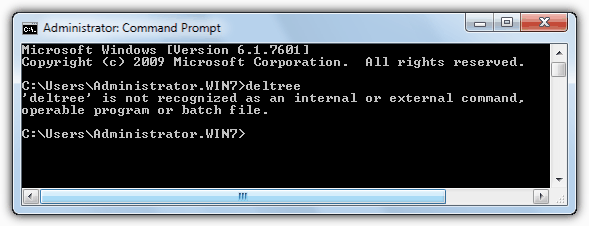
    I launched a Windows command prompt , and typed “deltree /?” to display all the commands for deltree because I couldn’t remember what its parameters are. It was quite embarrassing to see the error message “deltree is not recognized as an internal or external command, operable program or batch file.” The deltree command is no longer used in Windows 2000 and Windows XP, Vista or Windows 7, as the last operating system supporting the deltree command was Windows ME.

    deltree is not recognized

    After a little searching, I found the deltree command replacement for Windows 2000, XP, Vista and Windows 7.
    (more…)