Category: Computer

  • Trick to get FREE 1 Year a-squared Anti-Malware Genuine Full License Worth $40

    This blog site is mostly on computer tips and tricks and here’s one. Earlier this month I posted an article on how to obtain a free 1 year a-squared Anti-Malware genuine license but unfortunately the offer did not last long enough for more people to get it. The article was posted at 3PM (GMT+8) and the coupon code that converts the trial version to the full version expired just after 6 hours. If you’ve missed it the last time, I hope you are able to grab your free a-squared Anti-Malware license this time.

    If you didn’t know what is a-squared Anti-Malware, it gives a comprehensive PC protection against trojans, viruses, spyware, adware, worms, bots, keyloggers, rootkits and dialers with 2 cleaning scanners (anti-virus + anti-spyware) in 1 and 2 guards (signature scan + behavior analysis) against new infections. Unlike other malware protection products, a-squared Anti-Malware was designed to run parallel with other antivirus and firewall software without troubles. In case you find a conflict with another software, the support team will help to solve the problem quickly.


    The steps to get the free anti-malware license is exactly the same as the previous article. You need to sign up for a free a-squared account, check your email to get the temporary password and then convert a coupon code to a licensed software. Finally download and install the latest version of a-squared Anti-Malware and then enter the login information which you used to sign in to Customer Center.

    The step-by-step instructions that I previously written can be found here.

    The old expired coupon code used to be kam-nef-max-558 and it cannot be used to convert a license code anymore. Wait a minute, actually it can still be used if you add in another character to the code. I am not sure if it is a bug or if this is done deliberately. What you need to do is add a spacing at the beginning before the coupon code so it looks like something like this " kam-nef-max-558". Do NOT type the word “SPACE” but instead hit the spacebar on your keyboard then followed by kam-nef-max-558.
    a-squared anti-malware coupon code
    Amazingly a-squared accepts the coupon code and you now have a 1 year fully licensed a-squared Anti-Malware associated to your account.

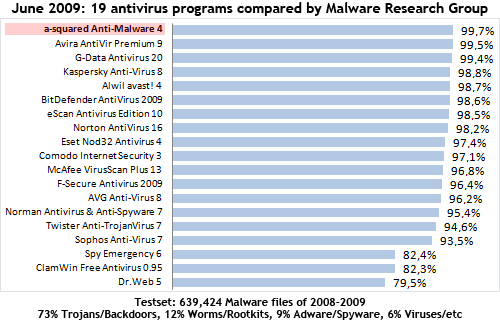
    a-squared Anti-Malware does takes up quite a lot of memory when real-time protection is enabled. It could be due to having two scanners (anti-spyware + anti-virus) protecting your computer from virus and spyware. The antivirus engine is powered by Ikarus and although the brand is not really that popular compared to Kaspersky, Norton and McAfee, surprisingly it is able to detect the latest icrypt stub. I could only find one recent test on a-squared Anti-Malware from Malware Research Group and a-squared Anti-Malware got number 1 by detecting 99.7% from 639424 virus samples. Even the older tests results on Ikarus shows that it has pretty high detection rate.

    Enough said. GET IT FAST BECAUSE THE CODE WILL DEFINITELY EXPIRE IN A FEW HOURS!

    Related posts:

  • FREE 1 Year Emsi Software a-squared Anti-Malware 3.5 Full License Worth $39.95
  • FREE 1 Year a-squared Anti-Malware Genuine License for EVERYONE
  • Convert a-squared Anti-Malware v4.5 to Full Version for FREE with 1 Year Coupon Code
  • FREE 1 Year Kaspersky Anti-Virus Genuine License Key for EVERYONE
  • FREE 1 Year iolo AntiVirus Genuine License Key for EVERYONE
  • Bypass Linkbucks, URLCash, UploadJockey and Auto Verify Download Links

    I was checking the moderated comments and also the comments that went into spam just now and there was a comment from Diabolo asking me if I know anything about ShareLinkDevil. No I haven’t heard of it but I decided to check it out since I had time today. I am glad I did because it is a very useful website that offers free service to check for active/dead the links for more than 400 one-click file hoster and also able to extract the real links for more than 300 redirectors or link-protector websites.

    share link devil

    The link checker acts like RapidShare Checker where it will check for the availability of the files except that it works on 400 sites. This is useful if you want to download a Blu-Ray rip movie with 80 links and you better check them all before you start downloading. As for redirectors and link-protector websites such as LinkBucks, UserCash, URLCash, Linx.in and etc, ShareLinkDevil can also decrypt and extract the original links. LinkBucks and URLCash are a way of making money but it can get very annoying. I’ve seen people redirecting from LinkBucks to URLCash and then only to the original rapidshare link.

    With ShareLinkDevil, simply paste any links and it’ll automatically decrypt the links and then checks it to see if the file is available or not.


    Let’s give this UploadJockey link a test. When I access this link from my browser, I see a full page of advertisement and Firefox shows that a popup has been automatically blocked. I had to click Skip this ad to continue and immediately 2 pop under advertisement windows opens up. Then I have to scroll right to the bottom to get the 7 available download links which is also encrypted. Now I click on Other link, it brings me to linkbucks page with a 15 seconds countdown. I had to look at the page for 15 seconds or the countdown stops. After 15 seconds, again I see the top bar with full of ads and end up with the message “The file could not be found. Please check the download link.”

    But if I paste the UploadJockey link to ShareLinkDevil, within seconds it found 7 mirrors and then checks all 7 links which shows 5 links are active and 2 not found. I didn’t need to go through all the annoying steps above to find that the link is dead.

    decrypt linkbucks urlcash

    SLD is on a free shared server (110mb.com) so it could get a little slow in processing your links during peak hour. If you find any links that are not supported by SLD, just write a comment in the guestbook and I am sure Diabolo will make it work. As for jDownloader user, you do not have to worry about these link protectors or redirectors websites because it has built-in support for link checking and decryption.

    [ Visit ShareLinkDevil ]

    Related posts:

  • Firefox and IE Auto Convert URL Text Links into Genuine Clickable Links
  • How to use CMS The Grabber to bypass Rapidshare download limit
  • Bypass Megaupload download slots limit
  • Latest CMS The Grabber 1.4.4 – Bypass Rapidshare Download Limit
  • Auto Download Multiple Parts from RapidShare using Firefox While You Are Sleeping
  • Convert a-squared Anti-Malware v4.5 to Full Version for FREE with 1 Year Coupon Code

    Nearly a year ago I’ve posted a tip on how to obtain a 1 year a-squared Anti-Malware license using a coupon code. For those that are still using it, I believe your license is about to expire and here’s a good news to you all! There is a new coupon code being circulated which allows you to convert it to a 1 year license. A year has gone by and many updates and improvements has been done on a-squared Anti-Malware. Last time it only scans for spyware but now it has integrated Ikarus scanning technology to detect and block computer virus.
    free a-squared antimalware license
    a-squared Anti-Malware monitors all active programs in real time for dangerous behavior (Behavior Blocking) and can detect new unknown Trojans, Worms, Viruses and other damaging programs (Zero-Day dangers) without daily updates. The signature-based security (a-squared and Ikarus double engine) ensures a very high recognition rate of known Malware such as Trojans, Worms ans Viruses.

    Just follow the steps on how to get a fully licensed 1 year a-squared Anti-Malware v4.5 that normally cost $40 for FREE!


    free asquared antimalware 4.5 license

    1. First you’ll need to have an account with a-squared. Go to http://www.emsisoft.com/en/software/account/ and signed up for one. Just enter your name and email address.

    2. Check your email address and you should get an email from Emsi Software (automail@www.emsisoft.com) with the subject Your user account information – Requires verification. Note down your password.

    3. Go to http://cc.emsisoft.com and login with your email and password that you got from step 2.

    4. Click on Manage Licenses on the left hand sidebar and click Get license by coupon code.

    5. Enter the coupon code kam-nef-max-558 and click the Convert button. You should then see that a-squared Anti-Malware has added to the list with a 1 year license period.

    6. Download a-squared Anti-Malware v4.5 and install.

    7. After installation, you will be prompted to enter an account to login. Enter the same email address and password that you entered in Customer Center on the program and click Log in. You now have a full version of a-squared anti-malware valid for 1 year.

    It is important that you run an update after installation to download the latest signature. The first update should take a while because I had to download a total of 17MB. According to Malware Research Group test conducted on June 2009, a-squared Anti-Malware is able to catch the most malware files compared to 18 other antivirus. A big part of the malware consist of trojans or backdoors.

    free a-squared anti-malware license coupon

    For testing purposes, I copied 19 real current live virus that are circulating around internet and networks today and a-squared anti-malware did not block anything. When I did a scan, it manage to detect all 19 files are virus. It also managed to detect all of the older version of private stub for a crypter called BCD. Same as Microsoft Security Essentials, it could not detect the private trojan on manual scan and also when I run it even after enabling Paranoid mode.

    When a-squared Anti-Malware is active, it has two processes which is a2service.exe and a2guard.exe both taking up 113MB. If you want to use a-squared Anti-Malware for on-demand scanning, disabling all real-time protection will drop the memory usage to only 10MB. If any of the background guard is enabled, the memory usage for a2service.exe instantly shoots up to nearly 100MB. During a deep scan, a-squared anti-malware never eats more than 50% of CPU uage. They developers of a-squared Anti-Malware should do something about the memory usage.

    Offer still works so get it fast before it ends! Thanks to saturnguy62 for sharing this with us in forum!

    Related posts:

  • FREE 1 Year Emsi Software a-squared Anti-Malware 3.5 Full License Worth $39.95
  • FREE 1 Year a-squared Anti-Malware Genuine License for EVERYONE
  • FREE Full Version System Mechanic 8 Registration License Key Code
  • FREE 1 Year Kaspersky Internet Security 2009 version 8 License Key for Subscribers
  • Updated FREE 1 Year PC Tools Internet Security 2009 Registration Code
  • Possibly Track Stolen iPhone, iPod, Camera and USB Flash Drives

    Previously I’ve suggested some tricks that can possibly help you to recover, track and locate your stolen laptop. What about small and useful gadgets such as USB flash drives, memory cards and MP3 players that are easy to carry around but also easy to misplace and get stolen?

    Here is a free security program that you can use to help protect your devices by alerting you when your USB digital device is connected to another individual’s computer. It is also able to track down the location of where your device is being used.


    ihound is revolutionary software that helps protect your devices by alerting you when your USB digital device is connected to another individual’s computer. All you need to do is:

    1. Sign up for a free account at ihound and login.
    2. Add a device to track.
    3. Download the ihound software that is specifically used to recognize your device
    4. Run the downloaded ihound software to install a tracking program on to your device
    Install tracking software to track stolen device

    When your missing USB digital device is being plugged in to a computer, you will:
    1. Get a notification email telling you that your tracked device is being located.
    2. Get a detailed report on where it is being used by logging in to ihound’s website.

    The method that ihound uses to track your USB devices is pretty simple. It uses the same method on how viruses spreads from USB flash drive. ihound copies 4 files (autorun.inf, Device, icon.ico, MyPasswords.exe) to the root of your USB device. Autorun.inf, Device and icon.ico are hidden and only MyPasswords.exe is visible which looks like a text document.

    Executable file looks like a text file

    So if the user’s computer settings has “Do not show hidden files and folders” selected and also “Hide extensions for known file types” checked, most likely they’ll be tricked to run MyPasswords.exe thinking that it is a text file containing passwords. Even accessing the drive letter from My Computer will also automatically run MyPasswords.exe.

    When MyPasswords.exe file is being run, important information such as computer name, user name, operating system, IP address, time and date will be automatically being sent to ihound’s server and ihound will also email the owner to notify that the missing device has been located. The owner can then log in to ihound’s website to print the report and bring it to the police or other authorities and have them call the ISP provider in order to determine who is using the IP address that was tracked.

    Track Missing Device

    I was wondering that since ihound software uses virus technology to try to trick the thief into running MyPasswords.exe, will it be identified as a virus or riskware? I uploaded MyPasswords.exe to VirusTotal and all 40 antivirus did not detect MyPasswords.exe as virus.

    File MyPasswords.exe received on 2009.05.30 03:33:09 (UTC)
    Antivirus Version Last Update Result
    a-squared 4.0.0.101 2009.05.30
    AhnLab-V3 5.0.0.2 2009.05.29
    AntiVir 7.9.0.180 2009.05.29
    Antiy-AVL 2.0.3.1 2009.05.27
    Authentium 5.1.2.4 2009.05.29
    Avast 4.8.1335.0 2009.05.29
    AVG 8.5.0.339 2009.05.29
    BitDefender 7.2 2009.05.30
    CAT-QuickHeal 10.00 2009.05.29
    ClamAV 0.94.1 2009.05.29
    Comodo 1215 2009.05.29
    DrWeb 5.0.0.12182 2009.05.29
    eSafe 7.0.17.0 2009.05.27
    eTrust-Vet 31.6.6530 2009.05.30
    F-Prot 4.4.4.56 2009.05.29
    F-Secure 8.0.14470.0 2009.05.29
    Fortinet 3.117.0.0 2009.05.30
    GData 19 2009.05.30
    Ikarus T3.1.1.57.0 2009.05.30
    K7AntiVirus 7.10.749 2009.05.29
    Kaspersky 7.0.0.125 2009.05.30
    McAfee 5630 2009.05.29
    McAfee+Artemis 5630 2009.05.29
    McAfee-GW-Edition 6.7.6 2009.05.29
    Microsoft 1.4701 2009.05.29
    NOD32 4116 2009.05.29
    Norman 6.01.05 2009.05.29
    nProtect 2009.1.8.0 2009.05.30
    Panda 10.0.0.14 2009.05.29
    PCTools 4.4.2.0 2009.05.29
    Prevx 3.0 2009.05.30
    Rising 21.31.21.00 2009.05.27
    Sophos 4.42.0 2009.05.30
    Sunbelt 3.2.1858.2 2009.05.30
    Symantec 1.4.4.12 2009.05.30
    TheHacker 6.3.4.3.334 2009.05.29
    TrendMicro 8.950.0.1092 2009.05.29
    VBA32 3.12.10.6 2009.05.27
    ViRobot 2009.5.29.1761 2009.05.29
    VirusBuster 4.6.5.0 2009.05.29
     
    Additional information
    File size: 32768 bytes
    MD5…: 05ba9227468cd8be274b428a6b9cc39b
    SHA1..: 9eb91c0c4df7c6a8b726554682d8df86b8b04bea
    SHA256: 39f885874a8088eb97d0a584fbd5b83d20034a4df41c99093a9d98c8fd344853
    ssdeep: –
    PEiD..: –
    TrID..: File type identification
    Win64 Executable Generic (49.3%)
    Generic CIL Executable (.NET, Mono, etc.) (42.2%)
    Win32 Executable Generic (4.9%)
    Win16/32 Executable Delphi generic (1.1%)
    Generic Win/DOS Executable (1.1%)
    PEInfo: PE Structure information

    ( base data )
    entrypointaddress.: 0x34fe
    timedatestamp…..: 0x4718f8e9 (Fri Oct 19 18:35:21 2007)
    machinetype…….: 0x14c (I386)

    ( 3 sections )
    name viradd virsiz rawdsiz ntrpy md5
    .text 0×2000 0×1504 0×2000 3.90 10359989d890f77b163dcecd553827c8
    .rsrc 0×4000 0×3110 0×4000 3.27 c9b1417067b33af69016a29e4017f342
    .reloc 0×8000 0xc 0×1000 0.01 275e249e83fc3ce939b34ce98ec25789

    ( 1 imports )
    > mscoree.dll: _CorExeMain

    ( 0 exports )

    PDFiD.: –
    RDS…: NSRL Reference Data Set
    ThreatExpert info: <a href=’http://www.threatexpert.com/report.aspx?md5=05ba9227468cd8be274b428a6b9cc39b’ target=’_blank’>http://www.threatexpert.com/report.aspx?md5=05ba9227468cd8be274b428a6b9cc39b</a>

    Actually this method is not perfect because the person who has your USB device must run MyPasswords.exe file either by being tricked or access the USB device from My Computer. The computer must also have an Internet connection to be able to send the important information to ihound’s server. If the computer has a firewall, it will definitely tell you that MyPasswords.exe is trying to access the Internet and send information. No matter what, ihound USB device tracking software is free and takes up less than 45KB from your USB device. Who knows it might help you to recover your missing USB device someday. Better safe than sorry.

    [ Track your USB digital device with ihound ]

    Related posts:

  • How To Recover, Track and Locate Stolen Notebook
  • Make Full Backup of Your Ipod, USB Flash Drive and MP3 Players By Imaging
  • How to Make Windows Autorun USB Flash Drives
  • Windows Requires Administrator Rights to Install USB Flash Drives
  • Windows Live Messenger 2009 Web Camera In Use 0x8AC70202 Error Caused by SiteAdvisor
  • Guaranteed and Immediate Free KAV 2009 License Key Valid for 183 Days

    Using one of the best antivirus software is very important. Not only it has to be capable of detecting both know and unknown virus, it must also have a low false positive detection. I will talk more about false positive detection later this week and share with you guys the importance of a low false detection. As you all know, my all time favorite antivirus software has always been Kaspersky. A good antivirus software must have a very good detection rate(able to detect know and unknown virus), low false positive detection(do not simply flag a legitimate software as threat) and also not resource hungry(slows down the computer).

    I’ve posted quite a few techniques on how to obtain Kaspersky genuine licenses. Previously I’ve also discovered how to activate Kaspersky chinese license key on English setup. It works at first but when Kaspersky found out, they created an update which will revert the settings back to chinese interface again. So if you’re stuck without a valid genuine Kaspersky Antivirus 2009 license, today I am going to show you how you can get a 6 months KAV 2009 license for free


    It is not as easy as inserting your email address and voila, you get the license key. It involves using a European country IP address, entering a valid Poland address and also solving a CAPTCHA that has Polish character that a normal keyboard can’t type. Most probably some of you already found this offer posted on other blogs but it involves using some really unstable methods. I assure you that the steps below are much easier and the success rate is 100%.

    First, you will need a Firefox browser. Then continue with the steps below.

    1. Install GreaseMonkey add-on.

    2. Install Kaspersky.pl Captcha Killer for GreaseMonkey. This script will translate part of the form from Polish to English, auto inserts important information such as Code and Address, and finally totally disables the CAPTCHA.

    3. Find a working Poland proxy and configure your browser to use it. Here is one working Poland proxy (78-131-204-131.tktelekom.pl:8080). If this proxy is unusable, try looking for one here and then check if the proxy is working or not.

    4. Go to http://www.kaspersky.pl/mag/pcwk/kav2009.html. You will notice that the Code and Your address has been automatically filled up for you.

    5. Enter your name, your email address and click Register button.

    6. Check your email and you should get an email from Kaspersky Lab Polska (info@kaspersky.pl). The 20 digit number that is separated by 4 dashes is your 6 months license key!

    I suspect that using any IP address from European countries will work and not necessary only Poland proxy. I will confirm this later at the comment area. This 183 days KAV 2009 license is a commercial license and not trial. If you’ve previously activated a trial license, you still use this license. This offer is actually meant for PC World magazine readers in Poland. So if you’re not a reader, the genuine license that you got from this promotion is not really that genuine after all. The decision is in your hands. Sorry for not attaching any screenshot examples to this post because I am in a hurry to go out and meet my florist that will be decorating for my wedding banquet! Hurry and get your free KAV 2009 license before its over! Thanks to paradisebird007 for sharing this with us in forum!

    Related posts:

  • Instantly Get a FREE 6 Months Kaspersky Anti-Virus 2009 License Key by YuvaYantra
  • FREE 210 Days BitDefender Total Security 2009 Genuine License Key
  • FREE Norton Internet Security 2009 Subscription Valid for More Than 1 Year (460 Days)
  • FREE 1 Year Kaspersky Internet Security 2009 Genuine License Key for EVERYONE
  • Free 9 Months Kaspersky Anti-Virus 2009 Genuine Commercial License Key for EVERYONE
  • Recover and Restore Deleted Email Messages from The Bat!

    First thing first, let me warn you that if you’ve accidentally deleted your emails in The Bat! and want to recover them, it is still possible but make sure that you “DO NOT CLOSE THE BAT! AND KEEP IT OPEN. ONCE YOU EXIT THE PROGRAM, IT WILL COMPRESS YOUR EMAILS AND IT IS NO LONGER POSSIBLE TO RECOVER YOUR EMAIL!

    Does anyone of you ever uses the recycle bin? When you delete a file, it goes to your recycle bin, giving you a second chance to restore the delete files. As for me, I’ve got a very bad habit that is always using the Shift+Delete command to delete unwanted files. Shift+Del key deletes the file without putting it to the recycle bin. So if I need to get back the file, I’d have to use a data recovery software. It happened a few times and luckily I managed to get back 90% of the delete files.

    I am using The Bat! email client to download all my emails. I didn’t like Microsoft Outlook or Windows Live Mail because they are prone to exploits and viruses. Maybe its just that I’ve gotten so used to it and didn’t want to waste any more time in learning how to use another email client. Two days ago I accidentally deleted all my emails in Inbox. I panicked because I know that recovering deleted emails is not the same as recovering deleted files and I didn’t have any experience in recovering deleted emails from The Bat!.

    Luckily I managed to recover and restore approximately 90% of the deleted emails, and I am more than satisfied. If you’re an unlucky person that shares the same fate as me, then here’s how to recover your delete emails.


    The Bat! has a built-in feature where it allows you to browse deleted messages for a folder (such as your inbox, outbook, sent mail and trash). Just select the folder and press Ctrl+B. Alternatively, you can also do that by clicking the Folder menubar and select Browse Deleted Messages.
    Browse Deleted Messages
    You can view the deleted email, but you won’t be able to use the command Copy to Folder or Move to Folder. I can save the email message into TXT or EML format but what if I have more than a thousand emails in my inbox which I accidentally deleted? I am going to suggest you a tool that can automatically extract all deleted emails, save them to .MSG extension which you can reimport them back to your The Bat email client. Sounds good? Just follow the steps below.

    1. Download The Bat! Message Recovery.

    2. Extract the downloaded rar file and run TBMRec.exe

    3. If Mailbox Name dropdown appears empty, that means the Path to Mailboxes is not right. Somehow this program is not able to read the path variable properly. Now open My Computer and paste %APPDATA%\The Bat!\ at the address bar and hit enter. It should automatically change to something like “C:\Documents and Settings\YOURUSERNAME\Application Data\The Bat!” in Windows XP. For Vista, it might be a little different. Copy the NEW address and paste it to The Bat! Message Recovery Path to Mailboxes.

    4. Click the drop down box for Mailbox Name again and all your email accounts configured in The Bat! should appear. Select the account that you want to recover.
    Recover deleted emails
    5. Next thing to check is the “Folder in Mailbox”. If you want to recover the deleted email from Trash, then select Trash. If Inbox folder, then select Inbox.

    6. Click the small button to set the location for the messages to extract to.

    7. Make sure Algorithmic is selected and click the Run button. Should take only a few seconds to complete.

    8. Go to The Bat! email client, select the Folder that you want to restore the email messages to, click Tools from menubar, select Import Messages and click on From .MSG/.EML-files… Browse the location where you set the “Extract messages to” in The Bat! Message Recovery program.
    Import Messages from The Bat!

    9. You can now select all of the messages and click Open. The Bat! will automatically import all the emails that you deleted.

    It definitely works because it did on my side. However, there are 2 small problems. I noticed that the latest past 2 months emails are not imported. I am not sure if it is the recovery program’s bug or I have too many emails. The recovery program did mention that it works on databases of The Bat! v1.44 and earlier versions. I am now using The Bat! v4.1.11, so there could be some incompatibilities that caused this problem. Another issue is all of the imported emails will appear as unread. You can select all of the emails and mark it as read. It’s not perfect but at least I managed to get back 90% of my emails. Hope this helps!

    Related posts:

  • How to Trace and Clean Up Spam or Mailbomb Messages from Email Inbox
  • Bounce Email Spam Messages Back to Spammers with Non-Delivery Notifications
  • Easily Send Private, Secure and Encrypted Email Messages
  • Remotely Recover Deleted Files on Network Computers for Free
  • Recover Deleted Files or Folders in Windows Vista
  • Easily Obtain FREE 90 Days ESET Smart Security 4, NOD32 Antivirus 4 and Mobile Antivirus Username and Password

    Previously I’ve posted articles on how to obtain free ESET Smart Security and NOD32 Antivirus username and password but the steps are painfully long and it involves masking your IP address to make you look like you’re accessing the promotional page from China. China proxies are hard to find and even if you manage to find one, the connection is very slow and unstable. Then you’ll need to download a special ESET Activation Tool to convert the activation code to a valid ESET username and password. I believe many of you would have given up half way since there are easier ways to use ESET software for free such as NodEnabler and etc…
    free ESS NOD32 MAV license key
    I am happy to share with you that there is a VERY easy way to obtain a genuine free 3 months username and password legally for the latest ESET Smart Security v4, NOD32 Antivirus and also for ESET Mobile Antivirus v1. All you need is a working email address and you’ll get the free ESET license in less than 5 minutes. Now is your chance to use ESET products legally without using piracy tools such as NodEnabler and etc. If you didn’t know, ESET is currently my second choice of antivirus. First is always Kaspersky.


    1. Go to this page http://www.nod32.lv/index.php/page_id/443 , enter your email address in the box and click the Send button.
    free eset username and password

    2. Check the email that you’ve entered in step 1 and you should receive an email from INITEC LATVIA SIA (nod32@nod32.lv) with the subject “www.eset.lv – bezmaksas licence 3 m?nešiem?”. Note down the registration code.

    3. Now go to http://www.nod32.lv/index.php/page_id/602

    4. Select Jauna licence and enter the registration code that you got from the email, name, email address and click Send. (Only the registration code must be valid and the rest are not important although you should enter a valid format of email address)
    Register eset activation code

    5. Your 3 months username and password for ESET will be displayed.
    eset v4 username and password

    6. If you haven’t installed ESET products, here are the direct download links. You’ll be prompted to enter username and password to download, just enter the login information that you got from step 5.
    ESET NOD32 Antivirus v4 32-Bit: http://download.eset.com/download/win/eav/eav_nt32_enu.msi
    ESET NOD32 Antivirus v4 64-Bit: http://download.eset.com/download/win/eav/eav_nt64_enu.msi
    ESET Smart Security v4 32-Bit: http://download.eset.com/download/win/ess/ess_nt32_enu.msi
    ESET Smart Security v4 64-Bit: http://download.eset.com/download/win/ess/ess_nt64_enu.msi
    ESET Mobile Antivirus for Smartphone: http://www.eset.eu/mobile-download/esetav_sp

    The page only says that the username and password is for ESET NOD32 Antivirus, it can also be used on ESET Smart Security and also Mobile Antivirus. NOD32 Update Viewer confirms it.
    ESET Mobile Antivirus license code

    One thing I couldn’t understand is why can’t ESET verify the license validity that I got from this promotion? NOD32 Updater Viewer usually can tell when will the license expire but it shows blank. Even in NOD32, i go to Help > Verify License Validity, I get the error “License could not be verified. Please make sure that you have properly entered a valid Username and Password, or run a license validity verification later.” I am very sure that the username and password is valid because I was able to check for updates and download the latest virus signature.

    3 months is a little short and if this offer is still available, you can continue requesting for 3 another months license to extend your subscription. If not, it’s not really hard to find a working valid username and password. The last time I tested ESET software, it manage to detect all known and unknown virus/trojans that I keep in my computer. So far only Kaspersky and ESET managed to do that. If you’re using ESET products in Vista, you do not need to worry about its memory usage because Vista is capable of automatically reducing the memory usage of all process in Windows. If on XP, installing memory cleaner software will do the trick.

    Enjoy! Thanks Raitokun for sharing with us!

    Related posts:

  • FREE ESET NOD32 Antivirus v2.7/3.0/4.0 Username and Password with 6 Months Subscription for EVERYONE
  • FREE 3 Months ESET NOD32 Antivirus Genuine Username and Password for EVERYONE
  • FREE ESET Smart Security v2.7/3.0/4.0 Username and Password with 3 Months Subscription for EVERYONE
  • Latest ESET NOD32 Antivirus v4 and Smart Security v4 Review
  • ESET NOD32 Antivirus and Smart Security v4 Includes Free SysRescue Recovery Live CD
  • Fix Video Playback Problems by Removing Bad Codecs

    Codecs are important because they are being used to compress the videos and audios into much smaller size. Compressing a video with different codec will give you different results in terms of quality of the video and also the file size. If a video is being compressed by DivX, we’ll need DivX codec to play the video or else we will only hear the audio being played but no video. There are a lot of codecs and the best way to make sure that you can watch many types of videos is by installing codec packs. Codec packs are a collection of codecs being packed into one installer and is configured by default not to have any conflicts.

    There are a lot of codec packs nowadays such as K-Lite Codec Pack, XP Codec Pack, Codec Pack All in 1, Matroska Pack, Satsuki Decoder Pack, The Codec, Combined Community Codec Pack and etc… I have no idea which one is the best but I’ve been using K-Lite Codec Pack for many years now and seldom have any problems with it. The important thing is I make sure that I do not uninstall nor upgrade to the latest version because I read that you’ll start to encounter weird video playback problems after doing that.

    If you have codec problems, here is something you can try first before uninstalling and reinstalling the codec pack.


    Here are two tools that is able to fix some broken codecs on your Windows computer. These tools are a little old but it works.

    1. Filmerit
    Filmerit fix direct
    Filmerit is a freeware application for cleaning and managing the DirectShow filters. Directshow is a very nice concept that Microsoft introduced in DirectX. Many useful filters are delivered originally with DirectX, but each application may install its proper filters, eventually replacing some original ones, and finally this process may create conflicts, and in some extreme cases block all multimedia applications.

    2. Codec-Sniper
    Codec Sniper Fix Codec Problems
    Codec Sniper is a simple, small and easy-to-use tool that will show all of the Directshow, video and audio codecs on your computer. Codec-Sniper also features a column in which you may see whether the codec is “OK”, or “Broken”. This smart application also allows you to delete any codecs that you know are old or that you don’t need.

    I am going to stress again that codecs are very sensitive and don’t mess around with them when they are working perfectly fine. Both Codec-Sniper and Filmerit should only be used when you encounter problems in video playback. Both tools are portable and free, so they are going in to my USB flash drive when I go out to service computers.

    Related posts:

  • Checking Installed Audio and Video Codecs On Your Computer
  • Problems viewing downloaded movie
  • Convert AVI Video Files Into Independant Self Running Executables
  • Fix AVI Video with Subtitle Playing Upside Down Problem
  • Play Downloaded RAR Video Files WITHOUT Extracting and Codecs
  • Edit Vista and XP File Types Association To Easily Compress PNG Image Files

    A file association associates a file with an application capable of opening that file. Sometimes we will need to edit Windows file association because maybe we want to use another program to open a file. There are times we need to manually fix a bad file association after uninstalling the software. Editing file associations in Windows XP is pretty easy. Just go to Control Panel > Folder Options and click on the File Types tab. As for Vista, it doesn’t have the File Types tab anymore and you’ll have to go to Control Panel > Programs and click Make a file type always open in a specific program.

    About two weeks ago I introduced 4 free command line tools that is able to compress image files without losing its quality. I’ve been using it daily to compress images before uploading it to this site and I find it a hassle to launch command prompt and manually typing the command line switches for every image file. Fortunately I managed to learn how to add a right click functionality to easily compress the file.


    Let’s take pngout for an example. We want to be able to right click on a PNG file and select an option that automatically compress the file using pngout.

    In Windows XP, go to Control Panel > Folder Options > click the File Types tab > look for PNG extensions and click the Advanced button. Click the New button, enter the following:
    Action: pngout
    Application used to perform this action: pngout.exe "%1" out.png
    Edit File Types Associations

    If you use the exact values above, make sure that pngout.exe is at C: drive or else you’ll get the error message “The specified program could not be found. Make sure the file name and path are correct.”. Alternatively, you could click the Browse button to locate pngout.exe. If you got it right, you should see pngout in the menu when you right click at a PNG image file. Selecting pngout from the menu will automatically launch pngout to compress the selected PNG file.
    Easily Compress Image File

    As for Vista, unfortunately it only allow the user to change the default program but cannot assign and associate different programs to different context menu entries. To do that, we’ll need to use third party software. I like to use ExtMan, a free and portable utility that is easy to use. By default the interface language is in German, just click the US flag to change it to English. ExtMan pretty similar to Windows XP File Types association. Just look for the PNG extension, click Edit Extension, click New Action button, and enter the values.
    Edit Vista File Types Associations

    Here are a list of command line switches for all 4 command line PNG compressors.

    The command below for OptiPNG will backup original PNG file by adding .bak extension.
    C:\optipng.exe -k "%1"

    Command below will save the compressed PNG file as original filename + _compressed.png
    C:\pngcrush.exe -e _compressed.png "%1"

    As for pngout, it will save the compressed PNG file as out.png.
    C:\pngout.exe "%1" out.png

    Be very careful because advpng doesn’t have the capability of backing up the original file. It can only overwrite the original PNG file.
    C:\advpng.exe -z4 "%1"

    Enjoy compressing PNG files without losing its quality by simply right clicking on the PNG image file!

    Related posts:

  • 4 Free Tools to Optimize and Compress PNG Images Without Losing Quality
  • FREE PPTminimizer 4.0 Genuine License to Compress PPT and DOC Files
  • What File is That? How To Identify Unrecognized Files Types and Format
  • Portable Universal Extractor that Supports Extracting All Types of Archive Files
  • Easily and Safely Optimize Vista by Disabling Unnecessary Vista Services
  • Download and Use Older Version of Windows Live Messenger or MSN Messenger

    The new Windows Live Messenger 2009 looks very nice but unfortunately it is very fragile. Very lucky few users have no problems at all connecting and using Windows Live Messenger 2009. I consider myself very lucky because the only problem I have is with the webcam and I managed to find a workaround to get it working. For those that could not get Windows Live Messenger 2009 to work, here are a few things you can do.

    Try to uninstall and then reinstall, hoping that it would work but the truth is it will never work. Another possible solution is to uninstall WLM 2009, download an older version of Windows Live Messenger 8.5 and try to install. This won’t work as well because you’re going to end up with the error “Your computer has a newer version of the Windows Live product(s) than the one you are trying to install. To install an older version, first remove the current version.” You can also try to install MSN Messenger 8.0 which would work and seemed to be connecting but you’ll end up with a popup asking you to upgrade “A newer version is available. You must install the newer version in order to continue. Would you like to do this now?” Click Yes and it brings to install the buggy WLM 2009. Hit No and it won’t connect.
    downgrade Windows Live Messenger to old version
    You can’t use new WLM 2009 nor the old WLM 8.0 or MSN 8.5. So the only workaround now is to use Meebo, Digsby, eBuddy, ILoveIM, KoolIM, IMhaha to connect to .NET Messenger Service. Not to worry because here is a tip on how to use an older version of Windows Live Messenger 8.5 or MSN Messenger 8.0.


    First of all, make sure that Windows Live Messenger 2009 is totally wiped off from your computer. Use ZapMessenger to remove any trace of WLM 2009. Then download Windows Live Messenger 2008 build 8.5.1302.1018 from here. Install and you should be able to connect without problems and without forcing you to update to the latest WLM 2009.

    Yes it’s that simple and it works on my side. However if somehow you are still being forced to update, here’s a simple hack on how to trick MSN servers into believing that you are using the latest Windows Live Messenger 2009. Let’s go through step-by-step on how to hack MSN Messenger 8.0 to connect without being forced to update.

    1. You can download MSN Messenger 8.0.0812 from OldVersion.com

    2. Use ZapMessenger to uninstall any version of Messengers on your computer.

    3. Install MSN Messenger 8.0.0.0812.

    4. Download Resource Hacker, extract and run ResHacker.exe

    5. Go to File > Open and browse the following location C:\Program Files\MSN Messenger\msnmsgr.exe for MSN Messenger 8. For Windows Live Messenger 2008 build 8.5, it will be in C:\Program Files\Window Live\Messenger\msnmsgr.exe

    6. Expand Version Info and expand 1.

    7. Click on 1033.

    8. Look for the line VALUE “ProductVersion”, “8.0.0812″ and change the 8.0.0812 to 14.0.8089.0726.
    Hack Windows Live Messenger 2008

    9. Click the Compile Script button.

    10. Go to File > Save and close Resource Hacker.

    Try connecting now and voila! .NET Messenger service server thinks that you’re connected using Windows Live Messenger 2009 build 14.0.8089.0726 when you are still using the good old MSN Messenger 8! OK using an older version of Windows Live Messenger is probably not the best solution but treat this as a temporary solution until the Messenger developers release a not-so fragile version of Windows Live Messenger 2009.
    Connect older version of Windows Live Messenger 2008

    Note: If somehow you could not install the older version of WLM even after cleaning it with ZapMessenger, then please try the other cleaner called Messenger Deep Clean.

    Related posts:

  • Download Windows Live Messenger 2009 Official Final Version
  • Enable Show My Webcam on Windows Live Messenger 2009 Workaround
  • Force Complete Uninstall MSN or WLM to reinstall Windows Live Messenger 2009
  • Windows Live Messenger 2009 Web Camera In Use 0x8AC70202 Error Caused by SiteAdvisor
  • Clean your MSN/Windows Live Messenger Interface
  • FREE iolo System Shield 3 Internet Security License Key

    I know there hasn’t been any freebies lately but here’s one shared by one of our forum members ndkj on how to get free genuine license for iolo System Shield 3. System Shield 3 Internet Security provides total Internet security by blocking spyware, viruses, and hackers from infiltrating your PC and causing harm. This powerful security suite includes: iolo AntiVirus to block viruses and other dangerous programs, iolo Personal Firewall to stop hackers and other external attacks, Spython AntiSpyware to eradicate spyware parasites, System Guard to monitor and stop malicious programs from changing system settings or damaging core operating system files, and a Security Optimizer wizard that repairs dangerous and potentially hidden security vulnerabilities. System Shield s comprehensive set of proven security technologies and an intuitive, all-in-one interface to provide everything you need to put a permanent end to PC threats. System Shield 3 Internet Security provides total Internet security by blocking spyware, viruses, and hackers from infiltrating your PC and causing harm.

    iolo System Shield 3 Internet Security normally cost $49.95 a year but is free for 3PCs if you follow the simple steps below. Whether you’re interested or not in this software, do grab your free license because freebies doesn’t come so often nowadays.

    Free System Shield license key

    1. Go to this page http://www.iolo.com/ads/softwaredotcom/200710/sspromo.aspx and click on the Continue button. Make sure you've disabled NoScript or Kaspersky or else you can't see the continue button.

    2. You should see that the unit price $49.95 has been reduced to $0.00. Click Secure Checkout.

    3. Fill up the required fields marked with an asterisk ( * ) in the form and click Review Order. Make sure you enter a valid email address because the license number will be sent there.

    4. Click Submit Order.

    5. When the page refreshes and tells you "Thank you! Your order #2821757XXXXX is complete.", check the email that you've entered in step 3.

    6. Open the email from iolo technologies, LLC (orders@iolo.com) with the subject "Thank you for ordering from iolo technologies, #28283XXXXX" and note down the User ID and Serial Number.

    7. Download the latest version of iolo System Shield 3 Internet Security and install.

    8. Select "I own System Shield 3 and can enter my serial number later" option and continue with the installation. You will get to a part to enter your licensing information. Copy and paste the information to the box and click OK. It will take a few seconds to verify and you now have a fully licensed iolo System Shield 3 Internet Security!

    After installing, both the personal firewall, antivirus and system shield will check for updates and you'll have to install the latest patch. The annoying part is the updates doesn't integrate nicely and you'll have to install either AV, Firewall, or System Shield update, restart and then continue installing another one. iolo System Shield 3 runs on Windows Vista, XP, 2000 32-bit with 256 MB of RAM. It takes up approximately 120MB during idle. Although it did say that Vista is supported, there are a few reports that the user is getting Windows Host Process (RUNDLL32) has stopped working error. Not sure what is the cause but make sure you install the latest update for Antivirus, Firewall and System Shield.


    Related posts:

  • FREE iolo System Mechanic Registration License Code and Download
  • FREE 1 Year iolo AntiVirus Genuine License Key for EVERYONE
  • FREE 1 Year iolo Search and Recover 5 Activation License Key
  • FREE 1 Year PC Tools Internet Security 2009 Genuine License Key for EVERYONE!
  • FREE McAfee Internet Security 2009 3-PC License Valid for 6 Months
  • 3D Multiple Desktop Switcher for Windows

    One big difference between Windows and Linux is Windows has only one desktop, and Linux KDE environment has a few. For example KDE comes default with four desktops and can have up to twenty. But in Windows, it can only have one until you use third party software to do that. The good thing about having multiple virtual desktops is you can organize your running application better by reading email on one, browse the web on the second, do your work on the third and etc. I’d say that one of the most popular tool for Windows is Sysinternals Desktops because it is very small in size and takes very little memory usage.

    Here’s another tool that one called DeskHedron recommended by one of the forum member Ismail which switches the desktop by using 3D effect. At first I thought it was another virtual desktop creator but the 3D effect really got me impressed.


    When you run DeskHedron, you will only see a tray icon at the notification area. Right clicking on the icon will only allow you to add (up to 9 virtual desktops max), remove virtual desktops, and go to the next or previous desktop. A better way would be using the hotkey Ctrl + Shift + Z to enter into 3D view. Then you can either use the mouse wheel or left and right cursor to switch between the virtual desktops. As attractive as it is, it can only run on Windows 2000 and XP and doesn’t support multi monitor environment.

    Create Multiple Linux Desktop in Windows

    There are some things that you need to take note of. Let’s say you run DeskHedron, the first virtual desktop is running Firefox, second desktop running Outlook and third desktop running uTorrent. If you are at second desktop and you terminate DeskHedron, all running programs in first and third desktop will be temporarily gone. If you want to retrieve all of them back, just run DeskHedron again and the original desktop with running programs will appear. Now if you switch screen, your second desktop is still there. As for the third one, you’ll need to add another desktop and it will automatically retrieve back what was previously running in third virtual desktop.

    Although DeskHedron takes very little memory usage, but it runs an additional explorer.exe whenever you add another virtual desktop. Even removing the extra virtual desktop and terminating DeskHedron doesn’t seemed to release the running explorer.exe. So do you use virtual desktops? Do share with me which one is your favorite.

    [ Download DeskHedron ]

    Related posts:

  • Windows Vista Flip 3D Alt+Tab Task Switcher in Windows XP
  • WebTop – Your Personalized Desktop at Anywhere
  • Minimize Running Application to Desktop as Thumbnail
  • Remotely Enable Windows Remote Desktop
  • Run multiple versions of Internet Explorer on the same PC
  • GMER is a Powerful Rootkit Detector and Remover

    Most of you should be familiar with the term virus, trojan, spyware, adware and worm. What about rootkit? A rootkit allows someone, either legitimate or malicious, to maintain control over a computer system, without the computer system user knowing about it. Rootkits are the toughest malware to detect because they often fools the users to believe they are safe and install themselves as drivers or kernel modules.

    The first time I encountered a rootkit is when both my laptop and desktop was infected by a virus called JambanMu. It is a virus but using rootkit method to hide itself. I felt that something was not right on both of my computers but no matter what security software that I used to scan my computers, it would come up nothing. Then I accidentally found out about a tool called GMER which is able to detect and remove rootkit. The name of this tool does sound like a gaming tool but it’s not. Actually I just wanted to take a look at how his tool works but it ended up telling me about the rootkit that is present on my system! Then after a little research, I found out that it was the JambanMu virus that I brought back from one of my work place.


    GMER is an application that detects and removes rootkits.

    Detect and Remove Rootkit with GMER

    It scans for:

  • hidden processes
  • hidden threads
  • hidden modules
  • hidden services
  • hidden files
  • hidden Alternate Data Streams
  • hidden registry keys
  • drivers hooking SSDT
  • drivers hooking IDT
  • drivers hooking IRP calls
  • inline hooks
  • Other than able to detect and remove rootkits, you can also view your computer processes, modules, services and files. It can also scan and list all the programs that are auto started when Windows is booted up. Another good thing about GMER is it has a built-in registry editor in case the rootkit or virus has enabled registry editing restriction. At the final tab, there is a CMD console where you can run command lines if the Windows command prompt has been disabled.

    Like I said, GMER did detect a rootkit on my computer but wasn’t able to totally remove it because it is a persistent virus that just kept coming back after cleaning it up. If GMER did not inform me about the rootkit presence on my computer, I could be the source of infecting many other computers with the computer virus.

    A lot of advanced trojan is able to use rootkit technology to hide the process by injecting to the kernel level but luckily not often used because it is unstable and will cause the computer to crash if it fails to inject. Although I personally do not worry so much on rootkit infection but it is still good to run GMER once in a while to check on my computer for any suspicious hidden process. It takes only a few seconds to scan your computer. If you can’t run GMER, maybe your computer is already infected by a rootkit that stops GMER from running. Try renaming gmer.exe to another name and then run it. There are actually a lot more free and portable anti-rootkit software, perhaps I should compile a list when I am feeling better from the bad flu that I am currently having.

    [ Download GMER ]

    Related posts:

  • UnHackMe – Best Rootkits Remover
  • CaSIR – A Very Effective Stubborn Computer Virus Infection Remover
  • Detect Hidden Process and Rootkit with DeepMonitor
  • OSAM a Powerful and Reliable Autorun Manager with Online Malware Scanner
  • ICQ 6.0 Build 5352 with Banner-Remover is Out!
  • 12 Free Portable Indonesia Local Antivirus Effectively Removes Indonesian or Asian Virus

    There are many types of virus and each has its own characteristics. Some will use the infected computer to launch an attack to a website, some to steal information, some to prank the user by making Windows behaving very weirdly but the one that I fear most are the ones that causes massive destruction on Windows by infecting all executables (.exe) file and making it impossible to cure/heal the files again.

    So far the worst one I encountered was JambanMu, a destructive virus originated from Indonesia. I spent 8 hours trying to clean it off from a computer lab but ended up bringing it back at home and infected both my laptop and desktop. Then after a few days, somehow the virus came back and infected all of the machines! I ended up reformatting all 30 computers and installed Returnil Virtual System to prevent any future virus from infecting the computer.

    Yeah I lost a lot of files that time and I couldn’t recover them back… Now there’s a new one called Windx-Maxtrox, a virus also from Indonesia that is capable of infecting executable files. From my experience, many antivirus and removal tools couldn’t clean virus originated from Asia very well. When Brontok virus is still very new, a few major antivirus companies like Kaspersky and BitDefender has removal tools that supposedly can clean it off but it didn’t work at all. Then I found a tool called Brontok-Washer developed by an Indonesian that worked perfectly. Anyway, what I wanted to share with you all today is I have a collection of free portable antivirus tool developed by Indonesians that is very effective in removing virus originated from Indonesia and Asian countries. Some of them can even detect popular international virus.


    1. PCMedia Antivirus (PCMAV)
    download PCMAV antivirus
    PCMAV is probably one of the most famous and actively being developed portable local Indonesia antivirus. It can even scan for unknown viruses using unique heuristic algorithms. The current version of PCMAV 1.93 Build 2 can detect and remove 2580 viruses including many variants of Brontok, Aksika, Aniee, Jambanmu, Windx-Maxtrox and etc (refer to readme.txt). PCMAV-CLN.exe is the portable scanner and it also includes a real time protection (PCMAV-RTP.exe) if you want PCMAV to protect your computer against these 2000+ viruses. Able to check for updates and you’ll have to manually download it from PCMAV’s website.

    2. ANSAV
    download ansav antivirus
    This is one of my favorite because it is actively being developed, contains a built-in updater, and useful plugins that reveals hidden files, registry fixes and etc. Latest signature detects 1108 viruses and you can enable heuristic scan from settings.

    3. SmadAV
    download SMADAV 2009 antivirus
    The latest SmadAV 2009 is still in beta, some of the planned new features such as built-in update and real time protection is still not available yet. It can detect 594 malwares and has 295 heuristics methods of detecting unknown virus.

    4. Eura AntiVirus-NG System
    Download Eura Antivirus
    This is an impressive free antivirus that is able to detect 1796 virus. It has heuristic detection of unknown virus, built-in auto update, real time protection, log file, and extra tools to check Windows auto startup area, registry fixed and etc. Unfortunately the interface is in Indonesian language which is very similar to our national language Bahasa Melayu.

    5. ELKAV Antivirus
    download elkav antivirus
    ELKAV Antivirus is another free antivirus which looks very impressive that is made from Indonesia and has an English interface. It has USB, explorer and registry protection. Other than that, you can add your own sample virus to the definition if the AV definition missed it. During testing, I have problems with the built-in updater and it couldn’t download the definition file. It’s still in BETA and hopefully this will be fixed soon.

    6. Gucup Antivirus
    Downlaod gucup antivirus
    Gucup Antivirus doesn’t have a professional or should I say convincing graphical user interface. It will automatically reset explorer.exe when you run Gucup and scanning takes quite a while. Latest signature detects 715 malwares and it has unique method of analyzing which can be enabled from menubar.

    7. Anti-Indovir RX-2
    download anti-indovir antivirus
    This is a simple virus scanner made in Indonesia. The interface is in English and has built-in online update. It also has a registry scanner and cache cleaner. Current database can detect 393 malwares.

    Here are some others which are old and not updated for a long time but contains quite a good amount of detection. An example is NAVi. Although it is updated recently, but it contains very little detection compared to some older antivirus listed below.

    NAVi – Last updated on February 2009
    Detects 184 virus
    http://www.narpes32.com/

    ScanLix AntiVirus – Last updated on June 2008
    Detects 361 virus plus 80 heuristic methods
    http://scanlix.com/index.php?option=com_content&task=view&id=16&Itemid=1

    AVIGen Anti Virus 2008 – Last updated on February 2008
    Detects 330 virus
    http://www.vb-bego.com/root/products/avigen/index.php

    Antv-MD5-Pattern – Last updated on February 2008
    Detects 8662 virus
    http://www.4shared.com/file/55990328/5f96c4e6/Antv-MD5-Pattern.html?s=1

    CompactbyteAV – Last updated on March 2007
    Detects 172 virus
    http://www.compactbyte.com/cav/index.php

    There are even older ones such as MAWAR and WAV which I won’t share it with you because it is really outdated and can only detect less than 50 virus.

    NOTE: Some of the portable antivirus above might be flagged as a threat/virus by your antivirus program. I have all of them on my computer and tested fine. If you’re feeling afraid, then don’t use them as I am not forcing you to and nobody is. This is another case just like Norton detected Brontok-Washer(a very effective brontok virus cleaner) as a Brontok virus which is absolutely a false detection.

    Related posts:

  • Effectively Remove Trojan, Virus, Spyware from Windows Startup
  • Manually Update AntiVirus Virus Definition Signatures Without Internet
  • Portable Local WebServer with Apache, SQL, PHP and Applications for Windows
  • Virus.org Offers Malware Scanning Service With Several AntiVirus Engines
  • FREE Dr.Web LiveCD To Scan and Remove Virus Without Starting Windows
  • Raymond.CC Website Down for 18 Hours?!?

    Apologies for the major downtime that lasted around 18 hours. I actually couldn’t access this site since yesterday night. I thought it was my ISP problem since so coincidentally there is a confirmed problem with my ISP. I think I will have to resubscribe to PINGDOM again to check this site uptime every minute and notifies me when it is down.

    Related posts:

  • 24 hours website downtime
  • Raymond.CC website inaccessible – Migration
  • 12 Hours of Downtime Today But NO MORE in Future
  • How to Automatically Start Downloading During RapidShare Happy Hours
  • How To Download All Files From a Folder on a Website or FTP