VPN Accounts With Other Possible Limits but Don’t Time Expire
These VPN services are either completely free to use or have some other restriction which is time or date limited.
1. etteGo
Protocol: L2TP
Expiry/Bandwidth Limit: After 512MB bandwidth usage
VPN Server Location: US, Netherlands, Canada, Ukraine, Latvia
Steps: Enter email address, activation account from email, download software or manually setup L2TP connection.
Restrictions: None

2. SecurityKISS
Protocol: OpenVPN, PPTP, L2TP
Expiry/Bandwidth Limit: 300MB usage per day with NO EXPIRY
VPN Server Location: US, UK, France, Germany
Steps: Download and install. To use PPTP or L2TP, provide email to receive the individually generated configuration.
Restrictions: Capped speed, no games, email clients, voip or video chats, and video/music streams.

Protocol: L2TP
Expiry/Bandwidth Limit: NONE
VPN Server Location: US
Steps: Download and install.
Restrictions: Display advertisements on top of web browser

4. CyberGhost
Protocol: OpenVPN
Expiry/Bandwidth Limit: 1GB per month with NO EXPIRY
VPN Server Location: Germany
Steps: Download, install and create account. Optionally get a 1 month free premium trial by providing email.
Restrictions: Involve a lot of steps in setting up which can be a bit confusing. Auto 6 hours disconnection and download speed limited to 2Mbps.

5. proXPN
Protocol: OpenVPN
Expiry/Bandwidth Limit: NONE
VPN Server Location: US
Steps: Download, install software, create account and activate account from email.
Restrictions: Speed limited to 300Kbps and initially forwards you to upgrade your plan to premium then wait 10 seconds to get to your site.

6. TorVPN
Protocol: OpenVPN
Expiry/Bandwidth Limit: 1GB per month with NO EXPIRY
VPN Server Location: Hungary
Steps: Create account, activate via email, install OpenVPN and copy files to OpenVPN config folder.
Restrictions: Account auto deactivated if idle for 7 days
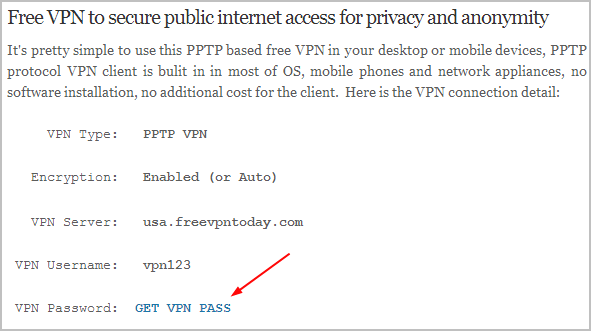
Protocol: PPTP
Expiry/Bandwidth Limit: NONE
VPN Server Location: US
Steps: Move slider using your mouse and click Get VPN info button.
Restrictions: Password are changed every 24 to 72 hours
8. USAIP
Protocol: PPTP, L2TP, SSTP
Expiry/Bandwidth Limit: NONE
VPN Server Location: US, UK, Netherlands, China, Germany, Hungary, Pakistan, Sweden, Ukraine
Steps: Download software, login using demo account and select server to connect
Restrictions: Auto disconnect every 7 minutes and speed capped at 200Kbps

9. Spotflux
Protocol: OpenVPN
Expiry/Bandwidth Limit: NONE
VPN Server Location: US
Steps: Download, install and connect
Restrictions: Software runs on Java

10. Tigervpns
Protocol: PPTP, L2TP
Expiry/Bandwidth Limit: After 100MB bandwidth usage
VPN Server Location: US, UK, Japan
Steps: Register and download software. Optionally activate account via email to get full 100MB or else only 10MB.
Restrictions: NONE

11. VPN Tool
Protocol: L2TP
Expiry/Bandwidth Limit: NONE
VPN Server Location: France
Steps: Fill up form, download software, install and enter login information to connect.
Restrictions: Download and upload speed limited to 96Kbps

12. Shellfire
Protocol: OpenVPN
Expiry/Bandwidth Limit: NONE
VPN Server Location: Germany
Steps: Download, install, create account, activate account by clicking on the verification link from email. Login to software and connect.
Restrictions: 60 seconds wait time before connecting, unable to stream video and speed limited to 384Kbps.

13. Kebrum
Protocol: OpenVPN
Expiry/Bandwidth Limit: NONE
VPN Server Location: Germany
Steps: Fill up form to register an account. Once logged in, you can either download their VPN software, access PPTP settings page or download the OpenVPN config files.
Restrictions: Only port 80 and 443 is allowed.

14. TunnelBear
Protocol: OpenVPN
Expiry/Bandwidth Limit: NONE
VPN Server Location: US, UK
Steps: Download, install, create account, activate account from email and connect.
Restrictions: 500MB bandwidth per month

If you are new to VPN and wonder how it works, below is a video demo on how to connect to one of the free VPNs above to change my computer’s IP address.
Please leave a comment if I have missed any VPN companies that offers free VPN accounts so that I can add it to the list and also do let me know which ones are no longer offering the free VPN accounts and I’ll gladly remove it from the list.