Author: raymond

  • 5 Freeware to Create Jukebox Server and Stream MP3

    Music is important to most people because it can affect the mood or emotion of a person and also has the ability to create an atmosphere depending on the genre that is being played. This is why you can find the ability to play music on almost every device such as on your computer, TV, phone and etc. Most likely you already have your own playlist with your favorite songs that you’ve spent years compiling but the biggest challenge is to be able to access them from any computer or device.

    Although there are already some cloud services such as Google Play Music and iCloud that let you store your entire music collection to be streamed online, you may want to setup your own audio streamer from your PC if you prefer the files to stay on your computer without storing them on remote servers.

    Here we have 5 free software that can turn your computer into a music server where you can access your music without uploading to any third party.
    (more…)

  • 2 Tools for Visitors to Download Images in Bulk from SmugMug

    SmugMug is one of the most popular paid photo sharing and image hosting websites. A lot of professional photographers use SmugMug to host their photos because it is easy to use and saves them the trouble from creating or managing their own website. A lot of useful features can be found on SmugMug ranging from simple basic settings to powerful smart gallery feature by dynamically adding images to a gallery based on keywords or other criteria. The images that are visible and accessible by visitors can also be downloaded but it’s limited to downloading one image at a time.

    SmugMug has never made it an option to allow visitors to automatically download multiple images. If you want to bulk download the whole gallery, the official solution is to request the owner of the gallery to generate a ZIP file containing all the images in the Organize area in SmugMug and send you the download link when its done. There used to be quite a few third party software tools that can batch download all images from a gallery in SmugMug but unfortunately most of them no longer work after SmugMug switched to a new platform in 2013.

    After testing, there’s only 2 tools that are left for visitors to download pictures from galleries hosted in SmugMug.
    (more…)

  • How To Make a Non-STEAM Counter-Strike: Global Offensive Server Using RevEmu or LumaEmu

    According to the official game and player statistics from STEAM, the number of players for Counter-Strike: Source has dropped drastically while the latest Counter-Strike: Global Offensive is the 2nd most played STEAM game after Dota 2. The combination of STEAM players from CS1.6 with CS:S merely takes up 10% of CS:GO. This clearly shows that Counter-Strike: Global Offensive is currently the more popular game in the Counter-Strike series.

    counterstrike player statistics

    Installing and running a dedicated CS:GO server is not difficult while the most challenging task is actually getting enough players to join and play in your server as long as possible or else it would be an empty server without players. One potential way to attract more players to your server is to accept (pirated) non-steam players because the Setti Masterserver statistics shows that there are more CS1.6 and CS:S non-steam players than the legitimate Steam players.

    In this article, we’ll show you how to download and install a Counter-Strike: Global Offensive server in Windows. After installation, you can proceed to configure it to accept non-steam players.
    (more…)

  • Fix Microsoft Office Word Has Not Been Installed For The Current User Error

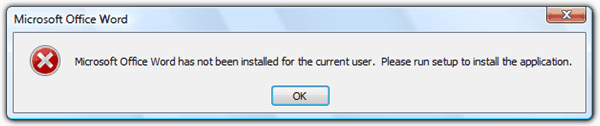
    Recently Microsoft came up with some updates that caused many users to get an error message saying “Microsoft Office Word has not been installed for the current user. Please run setup to install the application.” when you try to run it. After clicking the OK button, Microsoft Word closes. You’ll also be getting the same error message if you try to run any of the other office components such as Excel, Publisher, Access, Outlook etc. The worst part is uninstalling Microsoft Office and re-installing wouldn’t help to fix this problem. Before doing the above, you should at least use the official Microsoft Office Diagnostics tool to check if it has detected any other known problems.

    Microsoft Office Word has not been installed for the current user

    There’s a Microsoft Knowledge Base article on this issue and the solution is to give EVERYONE full control of the Opa11.dat file. Unfortunately this solution would only help to fix the problem when the non-administrative user accounts on the computer do not have permission to modify specific files that are used by the Office 2003 Setup program or the Office XP Setup program.
    (more…)

  • 6 Ways to Create a Kon Boot USB Flash Drive

    Kon-Boot is probably the best tool to bypass Windows login restriction because it allows you to access Windows by logging in to any user account without you knowing the actual password. There is no need to crack or reset the user’s password which is a great time saver and also doesn’t trigger user suspicion. There are two versions of Kon-Boot which is free and paid. The free version of Kon-Boot is actually an older version that comes with an ISO image to burn to disc and IMG file for floppy. Advanced users would know that it’s possible to create a bootable live USB drive from an ISO image file but unfortunately it won’t work for Kon-Boot.

    Kon Boot USB

    If you open the Kon-Boot ISO file with a supported archiver such as 7-Zip or PowerArchiver, you will see a [BOOT] folder with a file called Bootable_1.44M.img. This would mean that the author of Kon-Boot created a bootable CD ISO image from a bootable floppy. So in order to create a bootable Kon Boot USB, the trick is to use the floppy image instead of the ISO file. Here are 6 different ways to create a Kon Boot USB and hopefully one of the methods below will work for you.
    (more…)

  • How To Rotate Your Monitor Screen Display

    Did you know that most newer computer display adapters allow you to rotate your monitor’s display? Rotating your screen is not something that we normally do because our monitor sits the way it is and we don’t move them upside down. However, this is something that is more common these days because multi monitor setups are sometimes needed for professionals who perhaps need an extra portrait oriented display for their work. Some monitors can actually give you the option to rotate the display 90 degrees for this very purpose.

    If you think about it, reading books or documents on your screen is probably more natural when viewed in portrait mode. Books, magazines, printed documents and eBook readers like the Kindle are all oriented in this way. You won’t find much at your local library which you can read in a landscape view. A lot of people have netbooks such as EeePC nowadays because they are small and portable. You might consider rotating the screen so that you can read PDFs, eBooks and other documents in A4 format more comfortably and thereby turning the computer into an eBook reader.

    Rotate your screen and monitor

    For most displays, it’s pretty easy to rotate your viewable area by 90 degrees and switching between landscape and portrait views. Also, if you have a computer attached to a projector, the default view will most likely be upside down, so you will need to rotate your screen 180 degrees to get the image the right way up.
    (more…)

  • 2 Ways to Convert REG to EXE, BAT, VBS and AU3 to Bypass Registry Editing Restriction

    A lot of Windows and even third party software settings are stored in the registry. Editing the registry is mostly performed by advanced users rather than beginners because wrongly deleting or changing an important registry value can result in an unbootable Windows. This is why it is always good to backup the whole branch of the registry that you want to edit by using the Export function. The exported registry file will be saved as a .reg extension. Importing back the exported .reg file is as easy as running it and clicking the Yes button on the scary warning window that says “Adding information can unintentionally change or delete values and cause components to stop working.”

    Since registry editing is not really meant for computer beginners, there is a DisableRegistryTools setting in the registry that prevents the user from launching regedit and the command line reg.exe tool. This will also effectively block the ability to import a .reg file. This restriction is useful in a corporate environment to prevent users from messing up their computers but malware also uses this method to prevent the not-so-advanced user from attempting to disable the malware from the registry startup locations.

    A simple way to bypass this restriction is to convert the .reg file to other file format such as .exe and .vbs. Here we have 2 freeware tools that can assist in converting .reg file to various formats including batch (.bat) and AutoIt script (AU3).
    (more…)

  • 5 Ways to Automatically Check File Sharing Link Status

    Although free file hosting websites like Hotfile, FileSonic and Megaupload get shut down from time to time, new ones will continue to surface replacing the dead ones because it is a very lucrative business with revenues generated from advertisements and paid premium membership access. A lot of files can be found hosted on these file hosting websites but the biggest problem is your computer can easily get infected by adware or spyware if you’re being tricked into clicking on a fake download button which is actually an image from the advertisement spot.

    There are some free file web hosts that do not instantly tell you that the file is not available when you visit the download page if the file has been removed. Letitbit.net is a good example where you’ll need to solve a CAPTCHA, wait for a (fake) file search and then it reports that the file is not found. Turbobit.net does pretty much the same thing by faking a file search when the file is actually no longer available to download.

    Another common annoyance with the download links are they don’t usually last very long. The uploaded file will be removed upon receiving a DMCA complaint or when it has stopped receiving downloads for a period of time. To prevent wasting your time when visiting bad download links, here are a couple of ways to quickly check if the links are available or offline.
    (more…)

  • 5 Ways to Identify Unknown Songs or Music Using Sound Recognition

    There’s probably over a hundred million songs in the world and the number is certainly increasing each day. With that number of songs, the chances of you listening to a song that you really like and not knowing the title or the author is pretty high. The old school trick in identifying an unknown song is try to catch one or two sentences of the lyrics and look for it in a search engine such as Google. This method should work most of the time but definitely not for some instrumental genres such as classical, dance, electronic, jazz…

    There are apps for smartphone such as SoundHound, TrackID, MusicID and Bing Audio (selected countries only) that make it so much easier to recognize unknown songs by running the app and touching a button to start recording a short clip to perform the music recognition. As for desktop computers, music recognition is also possible through these free software or online services.
    (more…)

  • Create Kaspersky Update Server Mirror for Offline Updates

    It is a well known fact that Kaspersky has always been one of the best, if not the best antivirus software. However, one of the gripes that I have against Kaspersky is the first update normally takes a very long time to complete. That is because Kaspersky don’t use a web installer that downloads only the latest files, nor regularly push out an updated installer that contains the latest virus definitions. Their geo-located servers can definitely help to speed up the transfer for users at some parts of the world but unfortunately not for users located in Malaysia.

    kaspersky update

    In our latest test with Kaspersky 2015 products, the first update downloaded a total of 48.97MB and the detailed update report shows an average of 37.25KBps download speed that’s taken 24 minutes to complete. If you need to install Kaspersky on a few computers, a lot of Internet bandwidth and time will be wasted on the first update. A solution to this problem is to create a local update mirror by downloading the virus definition database and storing it in a shared folder. Then, configure Kaspersky to use the shared folder as the update source. The painfully long update process will complete in just a minute or less.

    Here are the steps to create a Kaspersky update server mirror that will also work for Kaspersky Anti-Virus, Internet Security and Total Security 2015.
    (more…)

  • 9 Automated Online Sandbox Services to Analyze Suspicious File’s Behavior

    A program that seemed legitimate may be a threat even if it looks safe. For example, if someone sends you a program via email that displays a cute or funny animation upon running, it is possible that the program is already doing something bad to your computer in background such as stealing your passwords/files, installing a keylogger, activating your webcam and etc without your knowledge. This is made possible by simply binding a malware to run in background with another legitimate program that runs in foreground.

    Although antivirus software and online AV multi-engine scanners does a great job in detecting binded malware, there is always a time frame of being fully undetected when it is newly crypted. So how do you know if a file is really safe or not? Analyzing malware and what it does requires a great deal of knowledge in computers and usage of advanced tools.

    An easier way for anyone to analyze a file’s behavior is by uploading them to the free online sandbox services for automated analysis and review the detailed and yet easy to understand report. Here are are a list of online file analyzers that can be used for free.
    (more…)

  • 2 Tools to List Files Protected by System File Checker (SFC)

    The Windows operating system contains thousands of important system files and if any of them get corrupted, some of the functions in Windows would not work properly or can even lead to system instability. Fortunately, Microsoft has implemented the protection of system files and also a hidden tool called System File Checker (SFC.exe) that can be used to scan for corrupted system files and even restore them.

    Whenever you try to make changes to the protected file such as rename, delete or move, a Files Access Denied window will be prompted informing you that “You need permission to perform this action. You require permission from TrustedInstaller to make changes to this file”.

    file access denied

    Making changes to protected system files is still possible by taking ownership of the files and then assigning the proper permissions. Other than that, lower level tools like IObit Unlocker are able to easily and instantly rename or delete the protected files without the need to reboot the computer.

    If you’d like to know what the files being protected in Windows are, here are 2 tools that can list them so you can prevent the core files from being accidentally or intentionally modified by third party programs.
    (more…)

  • 5 Ways to Check for Recently Created or Modified Files and Installed Software

    Knowing how to check for recently created or modified files in your computer is important because there might be a time when someone used your computer for a moment and you need check if there has been any third party software installed without your permission. Or perhaps you’re probably trying to find the document that you read a month ago but cannot remember the file name or the location where you’ve stored the file.

    Not only that, sneaky adware can also get into your computer when you’ve accidentally clicked the wrong button on a download wrapper and you won’t even realize it until you find new shortcut icons on your desktop or you get a random browser popup.

    You can easily find those files by simply investigating the files that were recently created or modified. In this article we’ll share with you a couple of ways to check for recently created or modified files on your computer.
    (more…)

  • Bypass Blogger Content Warning On Offensive Blogspot Sites

    There’s quite a few blogging platforms which you can use to quickly create a blog website. It is very useful in the sense that the owner of the blog site does not need to have any knowledge in creating a website such as registering a domain, signing up for a webhost, updating the name server, installing and configuring FTP client software, uploading files and etc. With a blogging platform such as Blogger, all you need to do is sign up for a free account, choose a subdomain name, select a design from the available templates and start writing with a WYSIWYG editor.

    Blogger is owned by Google and is one of the most used blogging platforms today. You might have come across a Blogger site that shows you a content warning “The blog that you are about to view may contain content only suitable for adults. In general, Google does not review nor do we endorse the content of this or any blog. For more information about our content policies, please visit the Blogger Terms of Service“. Clicking the “I do not wish to continue” button will bring you to Blogger’s main webpage while clicking on “I understand and I wish to continue” will allow you to access the website.

    blogger content warning

    There is no way to manually bypass the content warning and head straight to the website because if you look at the URL, the guestAuth query string comes with 78 random characters. Fortunately it is still possible to automatically skip the blogger content warning with any of the 3 methods below.
    (more…)

  • 6 Ways to Test Websites in Multiple Versions of Internet Explorer

    Even though there are a lot of Google Chrome and Firefox users, there is still a large number of people that are still using the Internet Explorer web browser by Microsoft because it is built-in to Windows operating system. Newer versions of web browsers offers better security and features, for example IE 9 and above only started to have full support for data URI which is very useful to reduce the amount of requests. IE 8 and below may need to use a fallback method or else the logo or images will not be loaded. Since Microsoft does not force their users to upgrade to the latest versions of Internet Explorer from the Windows Update, this means that it is important to make sure that the website design works even on an older version of Internet Explorer.

    The problem is we can only have one version of Internet Explorer installed in Windows. Moreover older Windows operating system such as Windows XP can only support up to Internet Explorer 8. One way to have access to multiple Internet Explorer versions on your computer is by using virtual machines but here are 6 easier ways that allows you to load and test websites on different versions of IE.
    (more…)