
Top 10 Best Free Keylogger Software to Monitor Keystrokes in Windows


 11 min. read
  Published on

A keylogger can be either a piece of software or a hardware device that can capture the keystrokes typed on the computer’s keyboard. A software keylogger can be run in the background and not get noticed by average users. They’ll have to depend on security software like anti-keyloggers or antivirus packages to tell them that a keylogger is present on the system, or else they will have no idea that things they do on the computer are being monitored.
There are many legitimate uses for a keylogger such as monitoring your children, making sure that they stay safe on the Internet especially when chatting and making friends with strangers. Or maybe even monitoring an employee making sure that they do not copy or leak out any confidential files. However, it can also be used for illegal or unethical purposes such as stealing passwords, reading private data and etc.
There are many software keyloggers around, some are freeware while others require a paid license to use. Free keyloggers are often more limited in functionality and stealthiness. After testing several free keyloggers, we’ve picked what we thought were the best and sorted them into a top 10. In addition to keylogging and features, we’ve also taken into account the ability of the keylogger to hide itself from the average user to prevent detection or tampering. All programs were tested in Windows 10 64-bit.
10. Spyrix Free Keylogger
Spyrix Free Keylogger is the free version of the paid Spyrix Personal Monitor. It is able to capture keystrokes, clipboard text and take screenshots but advanced features like social network & IM capture, visited webpage logging, webcam snapshots, sound recording, and alerts are not available. Spyrix can be launched with either a hotkey (Ctrl+Alt+A) or run command (runkey) and can be protected with a password.

We used to think Spyrix had potential if its stealth capabilities could be improved. Sadly, it went in the other direction and stealthiness is now non existent. Desktop shortcut, Start menu entry, installed program entry, and a tray icon are all shown in the free version. The process is visible in Task Manager and the install folder is not hidden. A good free keylogger has been spoiled by the fact it’s so easy to identify and kill by average users. This is a useful option only if the abilities to conceal the keylogger are not important to you.
Download Spyrix Free Keylogger
9. BlackBox Express
BlackBox Express is a security monitoring tool that can be used as a keylogger. The free version is from back in 2011 and is not for download on the official website but does work on the latest Windows 10. It works slightly different from the other tools because it can monitor 1 local PC and up to 200 remote PCs on the network. BlackBox Express can log keystrokes, web searches, ran programs, visited websites, email client programs, webmails, instant messaging chat programs, and capture screenshots.

You can exclude specific users from monitoring as well as adding alerts for keywords, websites and programs. BlackBox Express runs as a service and shows in Task Manager, on the desktop with a shortcut, in the Start Menu, in the installed programs list, and in Program Files. There’s no key combination shortcut so the only way to launch the program is from the shortcut or its executable in the program folder. Password protection is supported so at least other users can’t see the gathered logs.
8. KidLogger
KidLogger is an open source user activity monitoring tool. Other than just logging keystrokes and the clipboard, it can also record USB drive insertions, file/folder activity, microphone audio, browser history and take screenshots including from Skype videos. You’re also able to set keywords as an alert during capture. The log files can be viewed locally or from your KidLogger online account (not required). KidLogger can be installed on Windows, Linux, Mac OS X, Android, BlackBerry, and iOS.

It’s unfortunate that KidLogger is visible in Task Manager, the Start menu, the Program Files folder, and the installed programs list, a shortcut is optional on install. There’s no hotkey or run command to launch the program so you’ll need to start it from one of those options. KidLogger can be password protected but that’s not a great comfort as it’s quite easy for savvy users to find and kill the program. Like Spyrix Free Keylogger and BlackBox Express, KidLogger is a viable option if stealth is not a priority.
7. Real Free Keylogger
Real Free Keylogger is a simple no frills keylogger and was abandoned by its developer several years ago, the last update was to version 2.5 in 2014. After installation and during the initial launch, it will prompt you to set a password to protect the program so only you can access the settings and view the logs. You can set a different hotkey (default Ctrl+Alt+X) to launch the program when it is running in stealth mode.

The “Stealth Mode” button in the main window is a paid feature only although some measures are still taken to conceal the program. The program folder is set as system, there is no Start Menu entry, no installed programs entry, and no tray or desktop icons. A couple of processes do appear in Task Manager but they might blend in enough to possibly stop them being killed. Real Free Keylogger comes with a scheduler to automatically start logging and the log files can be exported as an HTML file.
6. Revealer Keylogger Free
Revealer Keylogger Free can record keystrokes, has multiple language support, has all/selected user startup settings, the ability to run with elevated privileges, hotkey support (default is Ctrl+Alt+F9), password protection and automatic log cleanup. Screenshot capture and automated delivery options are paid features only and disabled in this free version.

Although the options to hide the process, program files and startup entry are not available in the free version, Revealer Keylogger Free is not visible in the system tray, the Start Menu or the installed programs list. To uninstall, run the program, click on the Help icon at the top right, go to “Program end” and select Uninstall.
Download Revealer Keylogger Free
5. Actual Keylogger
Actual Keylogger used to be totally free but was then rebranded as shareware and renamed to Actual Spy. It has since been renamed back to Actual Keylogger although is still shareware only. The last freeware version we’ve been able to find is 2.3 from back in 2004. Amazingly, it still works on the latest versions of Windows 10 and does a better job of hiding itself than some of the newer free keyloggers.

Actual Keylogger can capture keystrokes from standard desktop apps and windows (not UWP apps) and allows you to access the program by two methods which are a hotkey (Ctrl+Shift+Alt+F7) or running the command “akstart”. The program does appear in Task Manager and the installed software list (not for Windows 7) although options like hiding the program folder, not adding a shortcut or Start menu entries do work. As an additional security feature, Actual Keylogger can be password protected.
4. Iwantsoft Free Keylogger
This free keylogger is able to log keystrokes, application/file/USB access, clipboard data, instant messengers, website addresses, social networks, and specific folders. Features like screen/webcam capture, audio recording, stealth remote installations, and reports are not available in the free version. There are a few invisibility settings such as the hidden mode hotkey (Ctrl+Shift+Alt+U), removing shortcuts from the Start menu and uninstall list.

A password option is offered on startup so you can’t open the program if it’s not known. Free Keylogger doesn’t show itself in the system tray, however, the install folder is clearly visible in Program Files, so could be deleted. Also, it’s emsvc.exe process is shown in Task Manager and can be killed. Fortunately, the process name is not blatantly obvious so stands a good chance of escaping detection by the average user. Some useful extra features are blocking selected websites and programs, and alerts for specific typed keywords.
3. Windows Keylogger
This keylogger actually appears to be quite closely related to the number one tool in our list. It has a slightly different user interface and lacks some of its more advanced features but the basic functionality is virtually the same. Windows Keylogger is able to monitor keystrokes, the clipboard, internet activity and process activity. Report delivery and screenshots are the only notable features reserved for the paid version.

A password needs to be created during setup while the main interface is opened with Ctrl+Shift+Alt+K or typing “wkshow” into the Run box. Click Load Report to show logging activity. The program does have a visible process in Task Manager but it’s hidden pretty much everywhere else, including the installed programs list, the Start Menu, desktop/tray icons, and the program’s folder. Scheduled monitoring and auto silent uninstallation is available. To uninstall manually, go to Settings > General.
2. REFOG Free Keylogger
REFOG Free Keylogger is now discontinued, no longer supported and not available to download on the REFOG website. We are looking at the last freeware version that comes from 2014. It obviously misses some of the paid options but it can still monitor keystrokes (not in Windows 10 UWP apps), visited websites, the clipboard, files/programs/activities and Skype messaging.

A tray/desktop icon is offered during install but fortunately, you can turn the option off. Two processes appear in Task Manager, one cannot be permanently killed but if you kill the other, keylogging will stop. By default, you can open the interface by pressing Ctrl+Shift+Alt+K or typing “Runrefog” into the Run dialog. These options can be changed along with adding a password/keyword to open the program.
REFOG Free Keylogger doesn’t show an uninstall entry and the main program folder is hidden (marked as a system folder) in the SysWOW64 folder on 64-bit systems. We also found out how to remove the full version of REFOG Keylogger, which turns out to be quite easy.
Download REFOG Free Keylolgger
1. Best Free Keylogger Lite
In our opinion, this is the best free keylogging program around at the moment, so Best Free Keylogger Lite lives up to its name. The feature set is quite impressive and it has all the standard logging functions for keystrokes, the clipboard, application activity, visited websites and screenshots. A limitation of the free version is only 10 screenshots can be created per day. The other premium features not available are report delivery and premium support.

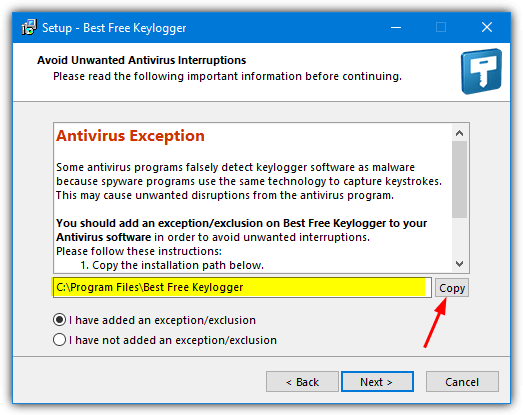
During install, you will be reminded to add an antivirus exclusion and asked to set a security password. The default key combination is Ctrl+Shift+Alt+K or type “unhide” into the Run dialog. Click Load Report to populate the window with activity. There are no entries in the Start Menu or the installed programs list, the program folder is hidden and there is no tray icon or desktop shortcut. A process is visible in Task Manager but its name is obscure enough to go unnoticed by many users.
There’s a number of other potentially valuable features in Best Free Keylogger Lite. These include monitor scheduling, limit monitoring by user or application, web content filtering (with exclusions), website block or allow lists, application blocking and time limits for web access. To uninstall the program go to Settings > General > Uninstall. It can also be set to automatically uninstall on a scheduled date.
Download Best Free Keylogger Lite
Disabling Windows Defender and Adding an Exclusion
A keylogger is very likely to get flagged and deleted by your antivirus while downloading, during install or when it starts monitoring. The easiest solution is to disable the antivirus before you download the keylogger, install and add an exclusion before finally re-enabling the antivirus. We can’t show that for every antivirus because they are all different. However, Windows Defender is integrated into Windows 10 so we’ll show you how to disable and add an exclusion to Defender.
1. Click on the Windows Security icon in the tray notification area or alternatively type Security into the Start Menu/search box.
2. Click on “Virus & threat protection” then click the blue “Manage Settings” text under “Virus & threat protection settings”.

3. Switch the “Real-time protection” option to Off and leave the window open.
4. Download and install the keylogger software, it should tell you the path it’s being installed to which you can make a note of or copy from the installer window.
5. In the window where you turned off real-time protection, scroll down and click on “Add or remove exclusions”, click “Add an exclusion” > Folder and browse for the location of the keylogger software.

6. Go back to the Windows Security window and turn the real-time protection option back on. Windows Defender should now not interfere with the keylogger.



Improve this guide

User forum
0 messages