Category: Windows

  • 5 Ways to View, Schedule Delete or Move Files on Next Windows Bootup

    Files that are currently opened or in use in Windows cannot be moved or deleted until they are closed. Most of the time closing the associated program would do the job but sometimes it still won’t work because its mapped to the memory or protected by another process. To solve this problem, most of us would simply rely on a third party software such as FileASSASSIN, LockHunter, IObit Unlocker, BlitzBlank and etc that is capable of detecting locked files and attempt to unlock them for further actions. Unlocking locked files has its own risk that can possibly cause crashes on the operating system.

    The safer solution is to mark the file for deletion on the next reboot and the Microsoft Windows operating system has made it easy for developers because it comes with a MoveFileEx API to delete or rename/move files the next time the system boots up. This task is performed by reading a registry entry called PendingFileRenameOperations located at HKLM\SYSTEM\CurrentControlSet\Control\Session Manager. Do note that the PendingFileRenameOperations registry key will not exist unless there is a pending operation.

    If you do not like messing with the Windows registry, here we have a few free tools that can help you read the PendingFileRenameOperations keys and display the list of pending file operations. Some of them have the capability of allowing you to schedule move and delete commands for the next reboot.
    (more…)

  • Map a Folder to a Drive Letter for Quick and Easy Access

    With hard drives having such huge capacities these days, it’s not unheard of for some people to have millions of files spread across their system. When you have a lot of files it is really important that everything is stored in a well ordered directory structure so files can be found more easily. For the less organized there are tools to quickly search the contents of your drives.

    Even if the overall directory structure of your system is efficient there might be several folders you access often that are found several layers down. An easy solution to get quick access to one of these folders is mapping it to a drive letter. This is a simple method and means instead of constantly drilling down through sub folders, just click on the drive in Explorer and you are taken directly there.

    Of the 26 drive letters available on your system, probably only a few are in use. That leaves several free letters that could be used for this purpose. Although it’s easy to map a network folder to a drive letter, mapping a local folder to a drive letter is slightly more difficult. Here are some ways to do it.
    (more…)

  • 2 Ways to Integrate Floppy SATA RAID Driver into Windows XP CD

    One of the major problems that has plagued Windows XP is it’s never had the facility to install itself onto some newer hardware without the need for extra steps. Although SATA, AHCI and RAID enabled storage controllers have been around for several years, the Windows XP install CD never gained the ability to install directly onto this hardware, and you need a floppy disk with the necessary drivers for XP to be able to recognize your hard drives during setup. If you don’t use a driver floppy, you will get the dreaded “Setup did not find any hard disk drives installed in your computer” error.

    Download a floppy SATA/RAID driver, extract it to floppy disk and then when installing XP, you need to press F6 at the specified time to install the driver. However, most desktop computers and all laptops don’t come with a floppy drive these days, and what makes it worse is you cannot use anything else such as a USB stick to put the drivers on, it MUST be a floppy drive. Although you can use an external USB floppy drive, it would be a waste to buy one just to use it for installing Windows XP. Recently we found a workaround that can enable you to install the SATA drivers from a USB flash drive after pressing F6, but this solution is known to be not 100% working on all computers.

    In order to get around having to use a floppy drive, you can integrate the floppy SATA/RAID driver into the Windows XP CD yourself. This way, you can install Windows XP on a SATA hard drive without using a floppy drive at all because the driver is already present on the CD. You’ll need to have an XP CD or the source files contained on one stored on your hard drive, the floppy SATA/RAID driver which can be downloaded from the motherboard manufacturer’s website and a CD/DVD writer.
    (more…)

  • Double Click C Drive at My Computer And Not Opening Fix

    With the popularity of USB removable media, more and more viruses started to appear that could take advantage of the ease at which these devices can be transferred from machine to machine using plug and play. It was quite easy to rewrite the Autorun.inf file to launch the malware on insertion of the drive because in general it is not write protected. It’s not just on removable drives that the autorun file can be created on though, it can be burned to a CD/DVD and also created on local hard drives including the system drives.

    An autorun.inf file at the root of your local drives can be problematic because when you open My Computer and try to access a drive, it could run a virus to infect your computer. Quite often antivirus software doesn’t touch autorun.inf because it’s only an instruction file that tells Windows what to automatically run when you access the drive from My Computer, not the malicious file itself. So even after the virus has been cleaned, you might find that you’re unable to access your C drive because autorun is pointing to the removed virus. A search window could appear, a script/file might try to to run or when double clicking your drive, it gives you an option to choose a program to open instead.

    While this issue is greatly reduced these days because Windows Vista and above won’t process the Autorun.inf file on any devices apart from CD-ROM drive types, it’s possible to still get this problem on XP, especially if the system isn’t fully patched. Usually the autorun.inf cannot be easily deleted because it has protected attributes, although expert users would have no trouble bypassing this. This procedure might be tougher for a normal user. Here’s 3 tools to easily delete the autorun file restoring the double clicking a drive option in My Computer.
    (more…)

  • 6 Ways to Restrict or Disable Mouse Right Click on the Desktop and in Programs

    We all know what the right click context menu is in Windows and how it works. At its best, the menu can be a hugely valuable resource to get certain tasks accomplished more quickly than digging through programs and their settings to do the same thing. But what if this menu is getting in your way for some reason and you want to disable it?

    Perhaps you or your children are playing games in a browser and keep accidentally right clicking when you don’t want to, or you just don’t want somebody inexperienced to have access to the quick options of renaming or deleting something on the desktop in case they delete something they shouldn’t. Disabling the right click of the mouse might sound like a simple thing, but you can’t just press a button in Windows to turn it off without a piece of 3rd party software or going deeper into the system settings.

    Here’s a selection of 6 solutions to enable you to turn off the right click of the mouse so the context menu isn’t called and can’t be triggered by accident.
    (more…)

  • 7 Ways To Recover CHK Files Created by CHKDSK and SCANDISK

    One of the things about Windows is sometimes it seems to do things in a way that doesn’t really make a great deal of sense. One of those situations is when an improper shutdown is detected or something like a USB stick is detached too quickly and Windows decides it needs to run a scan of the drive for errors, which in itself is not a problem. If you decide to skip, Windows will continue to ask you to scan because the dirty bit is still set on the drive. You let Chkdsk or Scandisk run and it will repair any problems with the file system and recover or repair any corrupted files affected because of it.

    Windows chkdsk

    The issue arises when you want to look at the files to see if any personal or important data has been affected because everything recovered by Chkdsk or Scandisk now has a generic filename of File****.CHK placed in a Folder called Folder.*** at the root of your drive! The odd thing is Windows has no utility or built in function to let you find out what these newly renamed files were before it changed them all to CHK files.

    Although sometimes a CHK file cannot be recovered successfully because it has been too badly damaged, many of them can be used again, but you need to find out what type of file each one is and the correct extension needs to be applied. If Windows crashed while editing a document, there is only 1 CHK file and your document is missing, then renaming the file to mylostfile.doc could be worth a shot, but in most situations you won’t be so lucky or there’s a lot of files that need checking.
    (more…)

  • Find Out the Command Line Location When Windows Opens a Process

    When you visit a lot of pages on the web looking for tips, tweaks and repairs, very often you will see people using command line arguments that you didn’t realize existed for that particular function or tool. Have you ever wondered how they find out what these shortcuts and command line arguments are? Do they actually find out themselves or do they look in the Microsoft Knowledge Base or search Google?

    A simple example is in the article for how to open the Safely Remove Hardware dialog box when the icon is not located it the system tray. One way to fix it is run the command line “rundll32 shell32.dll,Control_RunDLL hotplug.dll” and the Safely Remove Hardware box will appear. As you can see, it’s a complex command and not as simple as running a single executable. It involves several different commands but how would you figure out something like this yourself?

    Finding out commands and arguments is very easy when you know how to do it and where to look. Here’s a couple of possible ways.
    (more…)

  • 4 Solutions to Restore Missing or Disappeared Safely Remove Hardware Icon

    We’ve previously written about a trick on how to hide or remove safely remove hardware try icon. Although the tip has it’s uses, it’s is probably not useful for most of us because the majority of users own a USB flash or portable hard drive nowadays and we need the Safely Remove Hardware icon to eject or unplug our USB device so that the files in our USB flash drive won’t get corrupted.

    Restore Safely Remove Hardware

    Although Windows by default chooses “Optimize for quick removal” in the Write Caching policies tab in the device properties window, there are times you might have noticed when you try to stop the plugged in USB flash drive or device at Safely Remove Hardware, it says “The device cannot be stopped right now. Try stopping the device again later.” If you forcefully attempt to unplug the USB flash drive during that time, there is a big risk any previously opened files will become corrupted and then you will have to depend on data recovery software to get back the files. So, never fully trust the “Optimize for quick removal” setting!

    There are times that the Safely Remove Hardware Icon is missing or disappeared from the system tray. In Windows Safe Mode, you can’t find the Safely Remove Hardware icon at all. Is shutting down or restarting the computer the only way to safely stop and unplug your USB devices? Fortunately not. Here are some ways you can bring back the Safely Remove Hardware window when the icon is missing.
    (more…)

  • 8 Free DNS Services to Block Porn Sites without Installing Software

    There are various ways to try and stop inappropriate online content like pornographic material being accessible to children, one is to install parental control software. The software can be effective at blocking this type of material up to a point but can be messed with or bypassed. Another option which doesn’t need any software installed on your computer is filtering content through the Domain Name System (DNS).

    DNS is a set of online servers that translate standard website names into their corresponding IP address which the browser needs to show the website (for raymond.cc it’s 142.4.51.106). It’s like a huge Windows HOSTS file with billions of entries. ISPs generally use their own DNS servers which will be the default for all devices using your internet connection. However, they are not always that fast, private or secure.

    dns lookup name server

    There are many third party DNS services that can filter out specific website addresses, like ad hosting, malicious content, illegal content and of course, adult or pornographic content. Here we show you eight free DNS services that offer adult or pornographic content blocking as standard. All you have to do is add the DNS addresses to your Windows network properties. Instructions are supplied on the specific websites if you don’t know how to do it. IPv6 addresses are also included for more advanced users.
    (more…)

  • What is INFO2 File Hidden in Recycled or Recycler Folder?

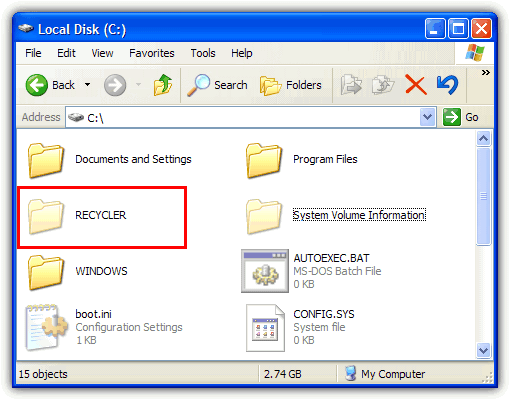
    Most of us know what the Recycle bin does and how to use it, and its internal workings have changed subtly over different Windows releases. Windows Vista and above now use meta data information to store the selected files and folders in a recycle folder called $Recycle.bin before being permanently deleted. Windows XP and below users will have differently named recycle folders on their drives called either Recycled or Recycler. What’s the difference between the Recycled and Recycler folders?

    In fact, they have no real differences and you will have have either folder at the root of your drive. What determines whether you have Recycled or Recycler is actually due to which filesystem is present on your hard drive. If it’s a FAT32 Windows partition, you will get Recycled and if you have NTFS, you’ll have Recycler. Some people might even have both of the folders because they’ve previously converted their drive from FAT32 to NTFS. Likewise, it’s not uncommon for users of Windows 7 or 8 to come across Recycler on an external hard drive which has previously been plugged into a system running XP.

    recycler folder in the c drive

    When you delete a file in Windows XP’s Explorer or My Computer, the file immediately appears in the Recycle Bin. This is what you see, but actually there is something going on in the background. The complete path and file or folder name is stored in a hidden file called INFO2 which is inside the Recycled or Recycler folder. This file is very important because if INFO2 becomes corrupted or removed, normally anything currently in the recycle bin could be lost lost unless you try to use a piece of data recovery software to get it back.

    Let’s do a small test to understand better what happens.
    (more…)

  • How to Repair Windows 7, 8 or Vista Without the Install DVD

    Back in 2006 when Windows Vista was introduced, it came with a brand new feature that is able to burn what’s called a “System repair disc” onto a blank CD. While it isn’t a disc full of utilities that can help you fix a huge number of issues such as the great Hiren’s Boot CD is able to do, there are number of functions built in that can do the basic tasks. These include helping a system with startup issues to boot, enabling you to run an offline system restore, a command prompt where you can use tools such as Diskpart, run the Windows memory diagnostic and restore a full system image backup if your installation is beyond repair.

    What’s good about this tool is it’s available in all versions of Windows Vista, Windows 7 and also Windows 8. These same functions are also found on the Windows Install DVD that is used to install the operating system, so you don’t necessarily need to have a repair CD if the install DVD is to hand. The problem with this though is if you own a branded computer or laptop such as Acer, Dell or HP, the chances are they only provided you with a recovery partition or a recovery DVD without the proper Windows DVD. In other words, you need to make your own system repair disc through Windows.

    the system repair disc main options

    A simple scenario where a repair disc would be useful is if you decide for whatever reason that you want to install Windows XP as well as your current Windows. It’s easy to install Windows XP on a system with Windows 7 or Vista installed, but XP would overwrite the current bootloader making only the XP installation bootable. The system repair disc would be able to reinstall the correct bootloader to make all operating systems bootable.
    (more…)

  • Windows Requires Administrator Rights to Install USB Flash Drives

    USB flash drives are now the dominant hardware storage devices if you want to quickly transfer data from one local computer to another. They’re cheap to buy, are available in multiple sizes and are more rapid than ever thanks to USB3. The good thing about a flash drive is it’s also plug and play so you just insert it into your PC or laptop and Windows does the rest. Flash drives can also be quickly unplugged although it’s always less risky to remove storage devices safely.

    When you insert a USB flash drive into your computer for the first time, Windows will automatically load the default USB Mass Storage device driver for it so you don’t have to install third party drivers from CD or the internet etc. After a few seconds Windows will say the new device has been found, drivers installed and it’s ready to use. There is an annoying error that can occur at this point which is Windows will ask you for the administrator username and password to install the device, it will say:

    You must be a member of the Administrators group on this computer to install this hardware

    member of administrators group to install

    Although this might not be such a surprise if you’re running a limited account because limited users cannot install third party device drivers by default, it shouldn’t appear if you are already the administrator on the computer. This seems to be an issue confined to XP and we’ve heard no mention of it happening on any other operating system.
    (more…)

  • How To Perform a Repair Install of Windows XP

    One of the features Windows XP introduced is the Repair Install option which in the event of a major PC crash allows you to keep your personal data while the core Windows files are replaced hopefully allowing the PC to get back up and running. A Repair install is not the same as a re-install or a clean/fresh install, a couple of other phrases you may have heard. A re-install usually means wiping the current operating system off and putting it on again, a clean/fresh install can also mean that but is more commonly used when Windows is being installed onto a drive or partition for the first time.

    The good thing about the XP Repair install feature is it won’t delete your personal files, installed programs, personal information or settings, it simply attempts to repair the operating system by replacing its own files. The repair feature is very useful when the operating system files have become too corrupted to fix but is something to be used only as a last resort. If this fails, your next step would probably be a format and complete re-installation of Windows XP.
    (more…)

  • How To Remove Shared Documents or Public Folders from My Computer and Explorer

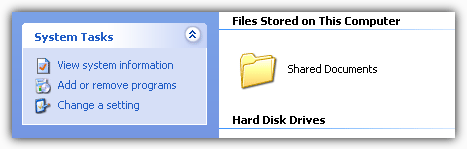
    Everyone with a Windows computer will have opened My Computer in Windows XP or Computer in Windows Vista, 7 or 8 at least once during their lives. And some may have wondered what some extra icons are doing there. In XP when you open up My Computer you’re greeted with a folder icon called Shared Documents and a lot of people have no idea what it actually does.

    Shared Documents folder

    In the newer operating systems of Vista and above you don’t get this because it’s got a different name and you don’t get a folder in the same window as your drives, but a similar thing still exists and is present in Windows Explorer. In Vista, 7 and 8 the function is called Public folders and is pretty much the same thing. But some users may wonder what it does and why is it there if you don’t use or need it.

    Shared Documents or Public folders and all their sub folders provide a place for you to store documents, pictures, video and music that users of different accounts on your computer can access. For instance, if you have an account for each member of your family, one user cannot read the contents of another users Document folders even if you want them to access files in there. Place the files in a Public or Shared folder and they are accessible to all users. This is also the case for other computers on your local network which can also make use of these folders.
    (more…)

  • Identify What is Loaded with rundll32.exe in the Windows Task List

    One of the problems when you’re trying to diagnose any problems in Windows, is quite a lot of information about what files and programs are loaded in the background is hidden away and not readily visible. One of these Windows programs is the svchost.exe process which just looks like a single process in Task Manager, but in fact can contain several dll loaded services which you won’t know about unless you know how to identify what’s inside the svchost process.

    Another process that might be showing in your Windows Task List but you can never know what it is will probably be the rundll32 process. Rundll32.exe is a part of Windows found in \Windows\System32 and used to run program code in a dll file as if it was an actual program. The dll file can’t be executed directly, that’s why the rundll32.exe is required to to run it.
    (more…)